AI & LLMs/Agentic AI · Part 5 of 14
·41 min read
Memory that lasts: semantic, episodic and procedural memory
Long-term memory for agents: facts, experiences and procedures that outlive one conversation. How each kind is represented, stored and used, then three builds: Mem0 with a local FAISS index on a Strands agent, a LangGraph customer-service agent fed by three memories, and memory that updates itself in the hot path. Re-run on Groq and on Claude, including a JSON-mode crash and an answer that invented a date it didn't have.
The previous post kept one conversation under control. This one is about what should survive the conversation: the user's preferences, the company's rules, what happened last time, and how a task is done. That is long-term memory: a store that outlives a chat, plus a rule for what goes in and how it comes back out.
#TL;DR
- Three kinds of long-term memory: semantic (what is true), episodic (what happened), procedural (how to act). Most agents need all three, kept per user.
- Mem0 extracts facts from a conversation with a model, embeds them and keeps them per user; the agent searches them before answering. (Part 1, from October.)
- Three memories, one answer: a LangGraph pipeline adds keyword-matched facts, the customer's profile and an order lookup, then the model writes the reply. ✅ Asked whether an order could still be returned, Groq said "you're still within the window"; the data has no delivery date. Claude said it didn't have the date.
- Memory that updates itself: a model detects "keep it brief from now on", the preference changes in the same turn and is saved to disk. ✅ On Claude all three turns worked. On Groq the third turn crashed: the API itself rejected a JSON-mode reply as invalid, and the code only caught a parsing error.
- The fixes in the course code are lessons too: a default dictionary shared by every instance, and free-text JSON parsing that silently skipped updates. 📘
#Three kinds of long-term memory
| Semantic | Episodic | Procedural | |
|---|---|---|---|
| Remembers | Facts: what is true | Experiences: what happened | Skills: how to act |
| Human example | Delhi is India's capital | My last train to Pune was two hours late | How to ride a bicycle |
| Agent example | "Refunds within 30 days"; "this user is vegetarian" | "Last time, the shipping API rejected this order ID" | "To track an order: validate the ID, then query the order database" |
| Typical store | Key-value, SQL, knowledge graph, vector DB | Logs, an episodes table, vector DB | Prompts, JSON workflows, the agent's graph itself |
📘 From the lecture. Long-term memory lives across conversations, so it is keyed by the user: in LangGraph terms a store with a namespace such as ("u_42", "profile"), where short-term memory is a checkpointer with a thread_id.
#Semantic memory: what is true
Facts not tied to a moment: business rules, product facts, and facts about a user. They can be symbolic (key-value pairs, SQL rows, a knowledge graph of triples such as (Laptop, is_a, Electronics)), vector-based (embedded statements, found by meaning) or hybrid. The lecture's knowledge-graph demo answers "what's a laptop's return window?" in two hops, Laptop → Electronics → 10 days, though no single fact says it. 📘
#Episodic memory: what happened
A diary of episodes: what was tried, when, and how it turned out. It lets an agent avoid repeating a failure and reuse what worked, the way a doctor thinks "this looks like the patient I saw last month".
Episodes can be stored as logs, as rows (an episodes table and a steps table), as embeddings for "find similar past situations", or as a graph of events. 📘
#Procedural memory: how to act
Skills and workflows: the steps that work, stored as instructions in a prompt, as a JSON workflow in a database, or as the agent's graph itself. Where episodic memory says "this failed last time", procedural memory says "this is how we do it". 📘
#Part 1: Long-term memory with Mem0
In this exercise we build personal assistant agents that remember each user's preferences across conversations. Mem0 is the long-term memory, and a web search tool supplies fresh information.
#What is Mem0?
Mem0 (pronounced "mem-zero") is an open-source memory layer. It gives an otherwise stateless model a persistent store of facts about a user, so the agent can recall them in later sessions.
It works in four moves:
- Add: you pass in a conversation. Mem0 uses an LLM to extract the facts worth keeping, such as dietary preferences or working location, instead of storing the raw transcript.
- Store: the facts go into a vector store, so they can be searched by meaning. Mem0 can optionally add a graph store to capture relationships between things.
- Update: when a new fact contradicts an old one, Mem0 can update or delete the old memory instead of piling up duplicates.
- Search: before each model call, search with the user's message, take the top few matching memories and put them in the prompt.
DataRequest or acknowledgment
#Embeddings, FAISS and fastembed
The word "searched by meaning" hides three ideas that are worth understanding before the code.
Embeddings. An embedding is a list of numbers that captures the meaning of a piece of text. Texts with similar meaning get lists that are close together, and texts with different meaning end up far apart. This is how "Suggest a restaurant" can land near "I'm vegetarian", even though they share no words.
FAISS. FAISS (Facebook AI Similarity Search) is an open-source library from Meta for fast similarity search over vectors. It is the "vector store" Mem0 uses here. A FAISS index is the data structure that holds all the vectors and answers the question "which stored vectors are nearest to this one?" quickly.
fastembed. Something has to turn text into those numbers. If you were on Amazon Bedrock, the course notebook would use Titan embeddings. Groq has no embeddings API, so here the embeddings run on your own machine with fastembed, a lightweight library from Qdrant. It runs small pretrained models through ONNX Runtime on the CPU, so it needs no GPU and no PyTorch.
Put together, when a user says "I'm vegetarian":
- The Groq LLM extracts the fact.
- fastembed converts that sentence into a vector with 1024 numbers.
- The vector is stored in the FAISS index.
- Later, a query like "Suggest a restaurant" is embedded by fastembed too, and FAISS finds the nearest stored vector.
#Set up the environment
Install the dependencies first. %pip is a notebook command that installs into the notebook's own Python, -q keeps the output quiet and -r reads the package list from a file.
%pip install -q -r requirements-groq.txt
Then the setup cell. Four of its imports are part of Python's standard library, and only dotenv has to be installed.
| Import | Package | What it does here |
|---|---|---|
os | standard library | Reads and sets environment variables, and works with paths |
re | standard library | Regular expressions, used later to clean up user IDs |
shutil | standard library | File operations; shutil.rmtree deletes a whole folder |
warnings | standard library | Hides noisy library warnings so the output stays clean |
dotenv | python-dotenv | Loads KEY=value lines from a .env file into the environment |
import os
import re
import shutil
import warnings

warnings.filterwarnings("ignore")  # hide noisy library warnings

# Loads variables from a .env file into the environment.
from dotenv import load_dotenv

load_dotenv()  # reads GROQ_API_KEY from a .env file, if present

# Which Groq model to use. Falls back to gpt-oss-120b if GROQ_MODEL_ID isn't set.
MODEL_ID = os.getenv("GROQ_MODEL_ID", "openai/gpt-oss-120b")

# Mem0 uses two models: a small LLM that extracts facts from what the user says
# (on Groq), and an embedding model that indexes memories (local; see
# "A local embedder for Mem0" below).
os.environ.setdefault("MEM0_LLM_PROVIDER", "groq")
os.environ.setdefault("MEM0_LLM_MODEL", "openai/gpt-oss-20b")

# Skip the interactive "are you sure?" prompt when the agent stores memories
os.environ["BYPASS_TOOL_CONSENT"] = "true"

# Turn off Mem0's anonymous usage telemetry
os.environ["MEM0_TELEMETRY"] = "False"

# Keep Mem0's history database inside this course folder
os.environ["MEM0_DIR"] = os.path.abspath(".mem0_course")

# Start from a clean slate: the memory tool's local FAISS index and this course's Mem0 data
shutil.rmtree("/tmp/mem0_384_faiss", ignore_errors=True)
shutil.rmtree(os.environ["MEM0_DIR"], ignore_errors=True)
# Recreate the folder right away. Mem0 only creates it when it is first imported,
# so without this line, re-running this cell in the same kernel would leave Mem0
# with nowhere to put history.db ("unable to open database file").
os.makedirs(os.environ["MEM0_DIR"], exist_ok=True)
print("Ready")
load_dotenv() is the key line for secrets. It reads the .env file and puts each line into os.environ, so os.getenv("GROQ_API_KEY") works as if you had set the variable in your shell. If there is no .env file, it quietly does nothing. Add .env to .gitignore so your key never reaches git.
Two kinds of assignment appear in this cell:
os.environ.setdefault(...)sets a value only if it isn't already set, so you can override it from outside.os.environ[...] = ...always overwrites.
What the cleanup lines do:
/tmp/mem0_384_faissis where the Strands Mem0 tool keeps its FAISS index. Don't read the384in that folder name as the vector size: this notebook's embeddings have 1024 dimensions.- Deleting it means the agent starts with no memories, so earlier runs can't leak into your demo.
- The next line deletes
MEM0_DIR, which holds Mem0's own data, including its history database. Clearing both keeps the vectors and the history in sync, and clearing only one would leave memories without their history, or the reverse.
#Imports and the Groq model
# DDGS = DuckDuckGo Search client (the `ddgs` package). Free web search with no API key.
# This is what gives the agent its "websearch" ability.
from ddgs import DDGS

# Agent: the class that runs the agent loop (model -> tool call -> result -> model).
# tool:  decorator that turns a plain Python function into a tool the agent can call.
from strands import Agent, tool

# Adapter that talks to any OpenAI-compatible API. Groq speaks that protocol,
# so this one class works for Groq by changing only base_url and api_key.
from strands.models.openai import OpenAIModel

# Controls how the agent runs tool calls when the model asks for several at once.
# "Sequential" means one after another, not in parallel. That is safer here because
# memory reads and writes share one local file, and it is gentler on Groq's rate limits.
from strands.tools.executors import SequentialToolExecutor

# Wraps a Python function plus a tool spec (name, description, input schema) into a tool
# object. Used when you want to build a tool by hand instead of with @tool.
from strands.tools.tools import PythonAgentTool

# The ready-made description of the Mem0 memory tool (what it is called, what actions it
# offers, what arguments it takes). Renamed on import so it reads clearly in your code.
from strands_tools.mem0_memory import TOOL_SPEC as MEM0_TOOL_SPEC

# Mem0MemoryTool:    the function that runs when the agent uses memory, i.e. store,
#                    retrieve or list memories.
# Mem0ServiceClient: the client class that connects to Mem0. It is imported here, but
#                    the code in this post never calls it directly.
from strands_tools.mem0_memory import Mem0MemoryTool, Mem0ServiceClient

# The LLM the agent will use, reached through Groq's OpenAI-compatible endpoint
model = OpenAIModel(
    client_args={
        "api_key": os.environ["GROQ_API_KEY"],
        "base_url": os.getenv("GROQ_BASE_URL", "https://api.groq.com/openai/v1"),  # or a local OpenAI-compatible server
        "max_retries": 5,  # retry dropped connections (the client default is 2)
    },
    model_id=MODEL_ID,
    # Groq reasoning models stream their thinking by default; hide it so only the answer prints.
    params={"extra_body": {"include_reasoning": False}},
)
Which pip package each import comes from:
| Import | Package to install | Role |
|---|---|---|
ddgs | ddgs | Web search |
strands | strands-agents | Core agent framework |
strands_tools | strands-agents-tools | Prebuilt tools, including Mem0 memory |
Setting os.environ["GROQ_API_KEY"] with square brackets raises an error straight away if the key is missing. That is a clear early failure, unlike os.getenv, which would quietly return None.
#A local embedder for Mem0
Mem0 accepts any LangChain Embeddings object, so a few lines wrap fastembed in that interface. We pick mixedbread-ai/mxbai-embed-large-v1, a larger and more accurate English embedding model with 1024 dimensions, to match what the memory tool's index expects. The resulting MEM0_CONFIG is passed to every Mem0 client in the notebook.
langchain_core is the small base package of LangChain. It supplies the Embeddings interface here, and the previous post explains the wider LangChain family.
# TextEmbedding: FastEmbed's class that turns text into vectors. It runs the model
# locally on the CPU through ONNX Runtime, with no GPU or PyTorch needed.
from fastembed import TextEmbedding

# Embeddings: LangChain's abstract base class (the "interface") for any embedder.
# It only says "you must provide embed_documents and embed_query". Mem0 accepts
# embedders that follow this interface, so we make ours match it.
from langchain_core.embeddings import Embeddings

# A small adapter. FastEmbed does the real work, but Mem0 expects a LangChain-style
# object, so this class translates between the two.
class LocalEmbeddings(Embeddings):
    """fastembed (ONNX on the CPU) behind the LangChain Embeddings interface that Mem0 accepts."""

    def __init__(self, model_name: str):
        # Load the embedding model by name. The first run downloads the weights,
        # and later runs reuse the cached copy.
        self.model = TextEmbedding(model_name)

    # Used when storing: embed a batch of texts (the memories) at once.
    def embed_documents(self, texts: list[str]) -> list[list[float]]:
        # model.embed() yields one NumPy array per text. LangChain expects plain
        # Python lists of floats, so .tolist() converts each array.
        return [vector.tolist() for vector in self.model.embed(texts)]

    # Used when searching: embed a single question or query.
    def embed_query(self, text: str) -> list[float]:
        # Reuse the batch method with a one-item list, then take the only result.
        # The same model for both methods keeps stored and searched vectors comparable.
        return self.embed_documents([text])[0]

# Create the embedder. That 1024-number size must match the dimension the FAISS
# index was created with, or searches will fail.
embedder = LocalEmbeddings("mixedbread-ai/mxbai-embed-large-v1")  # 1024 dims, matching the FAISS index

# Sanity check: embed one word and print the vector length. It should print 1024.
print("Embedding dimensions:", len(embedder.embed_query("hello")))

# Config dict handed to Mem0. "provider": "langchain" tells Mem0 to use an embedder
# object we built ourselves, instead of one of its built-in providers like OpenAI.
# "model": embedder is that object.
MEM0_CONFIG = {"embedder": {"provider": "langchain", "config": {"model": embedder}}}
LangChain splits embedding into embed_documents and embed_query because some models treat a query differently from a stored document, for example by adding a prefix. Here both do the same thing, which keeps the adapter simple.
#The system prompt
The system prompt sets the agent's role, its limits and how it should use memory. It is guidance only: the hard boundary between users is enforced by the tool binding in create_agent below, not by these words.
SYSTEM_PROMPT = """You are a personal assistant for {user_name}.
You must not access or reveal any other person's information.
If you are asked a question about another person, politely refuse to answer.
Create helpful responses based on what you remember about {user_name}.
When {user_name} tells you about their preferences, store them in memory.
When {user_name} asks for something, first retrieve relevant memories, then use web search to find the most relevant answer."""
The {user_name} placeholders are filled in later with .format(...), so one template serves every user.
#One agent per user
Mem0MemoryTool(user_id=...) binds the memory to one user. PythonAgentTool then wraps that bound function with Mem0's tool description, so the agent sees an ordinary mem0_memory tool, but it can only ever reach that one user's memories.
SequentialToolExecutor makes the agent run tool calls one at a time. A model often saves several facts in one turn, and by default Strands runs those calls in parallel. Every call loads the same local FAISS file, adds a vector and writes the file back, so run in parallel they overwrite each other and memories are silently lost. Any tool that writes to a shared local file needs this.
# @tool turns this function into a tool the agent can call. Strands builds the
# description the model sees from the function name, the type hints and the docstring.
@tool
def websearch(keywords: str, region: str = "in-en", max_results: int = 5) -> str:
    # The docstring is the model's only guide to this tool, so it states what the tool
    # does and what each argument means. The examples (in-en, us-en) show the format.
    """Search the web for up-to-date information.

    Args:
        keywords: The search query keywords.
        region: The search region, for example in-en, us-en, uk-en, wt-wt.
        max_results: The maximum number of results to return.
    """
    try:
        # Run a DuckDuckGo text search. It returns a list of dicts, each holding a
        # title, link and snippet. No API key is needed.
        results = DDGS().text(keywords, region=region, max_results=max_results)
        # Tools must return text for the model to read, so convert the list to a string.
        # An empty result gets a clear message instead of an empty string.
        return str(results) if results else "No results found."
    except Exception as e:
        # Return the error as text instead of raising. The agent sees what went wrong
        # (rate limit, network) and can retry or answer without search, not crash.
        return f"Exception: {e}"

# A plain helper, not a tool: the model never sees it. It turns a display name into an
# ID that Mem0 will accept.
def to_user_id(user_name: str) -> str:
    """Mem0 user IDs allow letters, digits, _ - . only."""
    # strip() removes surrounding spaces and lower() makes it lowercase, so "Mona " and
    # "mona" map to the same memory. re.sub then replaces every character outside
    # letters, digits, "_", "-" and "." with an underscore, e.g. "Bunny Kaushik" ->
    # "bunny_kaushik".
    return re.sub(r"[^A-Za-z0-9_\-.]", "_", user_name.strip().lower())

# Builds one agent per user, each with its own memory.
def create_agent(user_name: str) -> Agent:
    # The memory tool is bound to ONE user here, in code, not by the model.
    # Mem0MemoryTool is created with a fixed user_id plus our MEM0_CONFIG (the local
    # embedder). The model can't choose or change whose memories it reads, so one user
    # can't see another's.
    memory = Mem0MemoryTool(user_id=to_user_id(user_name), config=MEM0_CONFIG)
    # Wrap the memory function as a Strands tool: (tool name, MEM0_TOOL_SPEC with the
    # description and input schema the model sees, the function that runs when called).
    memory_tool = PythonAgentTool("mem0_memory", MEM0_TOOL_SPEC, memory.mem0_memory)
    return Agent(
        model=model,  # the Groq model object built earlier
        # SYSTEM_PROMPT is the template from the previous step; format() fills in the
        # user's name so the agent knows who it is talking to.
        system_prompt=SYSTEM_PROMPT.format(user_name=user_name),
        # The tools the agent can use: memory (hand-wrapped) and web search (via @tool).
        tools=[memory_tool, websearch],
        tool_executor=SequentialToolExecutor(),  # memory writes share one local file: one at a time
    )
#Teach the agent a user's preferences
Meet Mona Mona. Her agent gets four sentences about her preferences in a single message:
# Meet Mona Mona
agent1 = create_agent("Mona Mona")
user1_comments = [
    "I am a veggie lover.",
    "I want you to know that I have a medical condition which requires low-sodium food and decaffeinated drinks only.",
    "I prefer full-service restaurants.",
    "I visited an Indian restaurant to have chai and I loved it.",
]

agent1("\n".join(user1_comments))
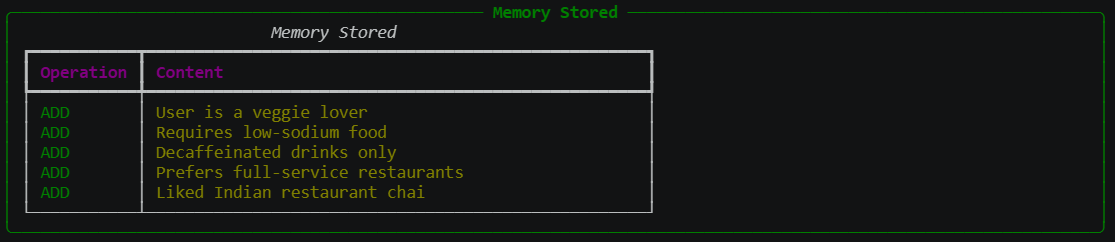
The memory tool prints what it stored:
And the agent replies:
Got it! I've noted that you:

- Love vegetarian meals
- Need low-sodium dishes
- Only drink decaffeinated beverages
- Prefer full-service restaurants
- Enjoy Indian chai (you loved it at the Indian place you visited)

Whenever you'd like a restaurant recommendation, a menu suggestion, or anything else
that fits these preferences, just let me know and I'll pull together the best options for you.
Notice that the agent made one store call, but Mem0 saved five separate memories. That is the "extract facts" step working: Mem0's LLM split one sentence into small, searchable facts.
#Reading the result object
The call also returns an AgentResult with the details of the run. Here it is in full, for the curious:
The full AgentResult
AgentResult(
    stop_reason='end_turn',
    message={
        'role': 'assistant',
        'content': [
            {
                'text': 'Got it! I’ve noted that you:\n\n- Love vegetarian meals  \n- Need low‑sodium dishes  \n- Only drink decaffeinated beverages  \n- Prefer full‑service restaurants  \n- Enjoy Indian chai (you loved it at the Indian place you visited)\n\nWhenever you’d like a restaurant recommendation, a menu suggestion, or anything else that fits these preferences, just let me know and I’ll pull together the best options for you. 🍃🥗☕️'
            }
        ],
        'metadata': {
            'usage': {
                'inputTokens': 881,
                'outputTokens': 131,
                'totalTokens': 1012
            },
            'metrics': {
                'latencyMs': 0,
                'timeToFirstByteMs': 1056
            }
        },
        'tracking_id': '934c53b7-ad06-401b-967f-a33290722a82'
    },
    metrics=EventLoopMetrics(
        cycle_count=2,
        tool_metrics={
            'mem0_memory': ToolMetrics(
                tool={
                    'toolUseId': 'fc_bbaf6aba-ec54-4ca3-87d9-cb11f1b598c5',
                    'name': 'mem0_memory',
                    'input': {
                        'action': 'store',
                        'content': 'User is a veggie lover, requires low-sodium food, decaffeinated drinks only, prefers full-service restaurants, liked Indian restaurant chai.',
                        'metadata': {}
                    }
                },
                call_count=1,
                success_count=1,
                error_count=0,
                total_time=6.409196499967948
            )
        },
        cycle_durations=[7.845792531967163, 1.2326867580413818],
        agent_invocations=[
            AgentInvocation(
                cycles=[
                    EventLoopCycleMetric(
                        event_loop_cycle_id='8a25945d-00f9-4e26-87bd-45dc49110a42',
                        usage={'inputTokens': 566, 'outputTokens': 120, 'totalTokens': 686}
                    ),
                    EventLoopCycleMetric(
                        event_loop_cycle_id='7259d6ed-c5d2-4208-93af-1e3abe04c53b',
                        usage={'inputTokens': 881, 'outputTokens': 131, 'totalTokens': 1012}
                    )
                ],
                usage={'inputTokens': 1447, 'outputTokens': 251, 'totalTokens': 1698}
            )
        ],
        traces=[
            <strands.telemetry.metrics.Trace object at 0x000001DDB28EBB60>,
            <strands.telemetry.metrics.Trace object at 0x000001DDFE4F5A70>
        ],
        accumulated_usage={'inputTokens': 1447, 'outputTokens': 251, 'totalTokens': 1698},
        accumulated_metrics={'latencyMs': 0}
    ),
    state={},
    interrupts=None,
    structured_output=None,
    checkpoint=None
)
The fields that matter:
| Field | Value | Meaning |
|---|---|---|
stop_reason | end_turn | The model finished its answer normally. It wasn't cut off by a token limit. |
cycle_count | 2 | The agent loop ran twice. |
tool_metrics | mem0_memory, 1 call, 1 success, 0 errors | One tool was used, and it worked. |
total_time (the tool's) | 6.4 s | Time spent inside the memory tool. |
cycle_durations | 7.85 s, 1.23 s | Cycle 1 was slow and cycle 2 was fast. |
accumulated_usage | 1447 in / 251 out / 1698 total | Tokens for the whole request. |
The two cycles are the agent loop from the first post: decide, call a tool, read the result, answer.
- Cycle 1 (566 tokens in, 120 out): the model read the message and decided to call
mem0_memorywithaction: store. Then the tool ran. - Cycle 2 (881 in, 131 out): the tool result went back to the model, which wrote the friendly confirmation.
Why cycle 1 took 7.85 s: about 6.4 s of that was the tool. Storing a memory is expensive, because Mem0 calls the Groq LLM to extract facts, then embeds them with fastembed and writes to FAISS. Cycle 2 only had to write one reply, so it took 1.2 s. The output doesn't break the time down, so that split is inferred from the timings.
Why input tokens went from 566 to 881: cycle 2 resends the whole conversation plus the model's own tool call and the tool's result. That is why agents get more expensive as the loop goes on.
Other things worth noticing:
- The model wrote the memory text, not the user. The stored
contentis the model's paraphrase of the message ("User is a veggie lover…"). What gets remembered depends on how the model summarises. - The model only knows the store succeeded. It said "I've noted that you…" but it can't see what was saved. Retrieval in a later session is what proves it worked.
latencyMs: 0probably means this model adapter doesn't fill that field. The real timings aretimeToFirstByteMs(1,056 ms here) andcycle_durations.- Empty fields:
state={},interrupts=None,structured_output=Noneandcheckpoint=Noneare features this run doesn't use. tracking_idandtoolUseIdare random IDs for tracing.
#Check what is in memory
agent1("Show what you remember about me")
Tool #2: mem0_memory
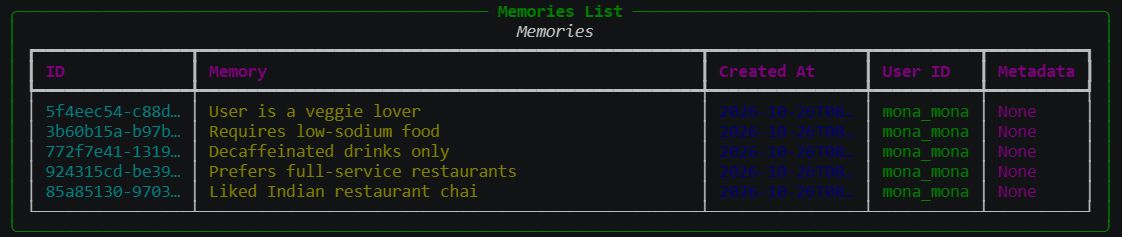
The agent then summarises it in its own words:
| Preference / Detail | Summary |
|---|---|
| Diet | Vegetarian (veggie lover) |
| Health needs | Low-sodium meals |
| Beverage preference | Decaffeinated drinks only |
| Restaurant style | Prefers full-service restaurants |
| Past experience | Loved the chai at an Indian restaurant you visited |
Three different things appear in this output:
Tool #2: mem0_memoryis a log line Strands prints each time the agent calls a tool. It is a running count: the earlierstorecall was the first, so this is the agent's second tool call.mem0_memoryis the tool's name, the one registered withPythonAgentTool("mem0_memory", ...).- The boxed table is printed by the memory tool itself. The model doesn't write it. It is a display for you.
- The summary table is the model's own answer. It read the tool result and rewrote it in its own words.
A few details in the screenshot are worth reading too. The user ID mona_mona is what to_user_id("Mona Mona") produced. All five rows belong to that one user. The … in the ID and date columns is the terminal truncating text to fit its width, and Metadata: None is there because the model passed an empty {} when storing.
#Memory plus live web search
Now the payoff: ask for something that needs both what the agent remembers and fresh information from the web.
from IPython.display import Markdown, display

display(Markdown(str(agent1("Find good restaurant options for me in Bangalore"))))
The agent first logs five tool calls, all web searches:
Tool #3: websearch

Tool #4: websearch

Tool #5: websearch

Tool #6: websearch

Tool #7: websearch
Then it writes the answer, a table of four full-service vegetarian restaurants with tips on keeping the meal low-sodium and the drinks decaf:
The agent's full answer
Here are four full‑service restaurants in Bangalore that line up with everything you told me (vegetarian + low‑sodium + decaffeinated drinks + full‑service vibe). I’ve added a quick note on why each one fits and how you can make the most of your health needs.
| # | Restaurant | Neighborhood / Address | Why it matches you | How to keep it low‑sodium & decaf | Quick contact |
|---|---|---|---|---|---|
| 1 | Phurr – “Vegetarian fine‑dining” | Jayanagar (3rd Block) & Indiranagar – (https://www.phurr.co.in/) | 100 % vegetarian, upscale full‑service setting, creative menu (North‑Indian, Continental, Asian) 【1†source】 | Ask the floor‑manager for “low‑sodium” preparation (e.g., ask sauces on the side, less salt) and request decaf tea/coffee or the mocktail bar’s decaf chai‑based mocktails. The staff are used to customising dishes for health‑conscious diners. | Phone: +91 80 4157 5500 |
| 2 | Neemsi Restaurant – Pure‑veg fine dining | JP Nagar (and Basavanagudi) – (https://neemsirestaurant.com/) | Pure‑veg, large menu with many Jain‑friendly (naturally low‑salt) options, full‑service ambience 【4†source】 | Their menu shows “low‑sodium” markers on several dishes (e.g., steamed veggies, dal without added salt). Mention your low‑sodium requirement; the kitchen can adjust. They also serve decaf masala chai and a range of herbal mocktails. | Phone: +91 80 2662 2000 |
| 3 | Carrots – India’s First Vegan Restaurant | Koramangala & Whitefield – (https://carrots-india.com/) | Vegan/vegetarian, health‑focused, full‑service café‑style, plenty of fresh salads and grilled veggies that are naturally low in sodium. | Choose “no‑salt” or “light‑salt” preparation; the chef will gladly omit added salt. They serve decaf filter coffee, herbal teas, and a decaf chai latte made with plant‑milk. | Phone: +91 80 4155 2000 |
| 4 | 1947 Restaurant – Fine Indian vegetarian cuisine | Multiple locations (e.g., Koramangala, Indiranagar) – (https://1947restaurants.in/) | Upscale vegetarian restaurant with a reputation for “clean” cooking; full‑service table service. | When ordering, ask for “low‑sodium” (most dishes can be prepared with reduced salt) and request decaf chai or decaf filter coffee—they keep a decaf coffee bean stock for health‑conscious guests. | Phone: +91 80 4155 7777 |
How to make the most of each place
- Call ahead (or mention when you’re seated) and say: “I need a low‑sodium vegetarian meal and only decaffeinated drinks. Could the chef prepare my dish with no added salt and recommend a decaf beverage?”
- Ask for sauces on the side – that gives you total control over sodium.
- Look for “Jain/veg‑friendly” labels on the menu; those dishes are often prepared without extra salt or oil.
- Decaf chai tip: many places will brew chai with decaf tea leaves and can swap regular milk for almond/soy if you’d like a lighter version.
A quick “next‑step” plan
- Pick one that sounds most appealing (e.g., Phurr for a chic dinner, Neemsi for a relaxed lunch).
- Reserve a table (most of these spots take online bookings via their websites or phone).
- When you arrive, remind the host of your low‑sodium and decaf needs – they’ll note it for the kitchen.
Enjoy your next Bangalore dining adventure! If you’d like more details (e.g., specific low‑sodium dishes on the current menu, directions, or a reservation link), just let me know. 🌿🍽️☕️
#Why five searches?
Five separate web searches for one request is the agent loop at work. The log shows only the tool name, not the queries or the model's reasoning, so the explanation below is inference.
- Where it fits:
#2was the memory lookup from before, and#3to#7come straight after it. So the agent read Mona's preferences first, then turned them into searches. "Restaurants in Bangalore" alone wouldn't satisfy "vegetarian, low-sodium, decaf, full-service". - You never asked for five. The model chose that itself. Likely reasons, roughly in order of plausibility:
- One search per constraint or angle, such as vegetarian fine dining in Bangalore, then low-sodium options, then decaf availability.
- One search per candidate. After finding restaurant names, it looked up details for each one. The answer has four restaurants, which could fit this.
- Retries after weak or failed results.
websearchcatches errors and returns"Exception: …"as text, so the model can see a failure and try again. Free web search is often rate-limited, so some of the five may have been retries.
- Why they appear one by one:
SequentialToolExecutor()runs tool calls one after another and never in parallel. The model may have requested them all at once or one per loop cycle, and the log doesn't distinguish those. - The cost: each search result goes back into the model's context, so the final call carried a lot of input. That matters on Groq's free tier.
To find out exactly what happened, check the result object after the run:
# response is whatever agent1(...) returned; assign it when you run the query
response = agent1("Find good restaurant options for me in Bangalore")

print("Loop cycles:", response.metrics.cycle_count)
m = response.metrics.tool_metrics["websearch"]
print("Calls:", m.call_count, "ok:", m.success_count, "errors:", m.error_count)
call_count should be 5, and cycle_count tells you whether the calls came in one batch or across several cycles. These are counts only. To see the query text itself you would need to print the tool inputs as they are made.
#Part 2: three memories feeding one answer
Mem0 decides what to remember by itself. The course's memory_demo_1.py goes the other way: all three kinds of memory are plain Python dictionaries, so you can see exactly what reaches the model.
Request or acknowledgmentData
def get_semantic_facts(self, state):              # 1. general facts, by keyword
    if "return" in state["user_query"].lower():
        relevant_facts["return_policy"] = self.semantic_memory["company_policies"]["return_period"]

def get_user_context(self, state):                # 2. what we know about this customer
    state["user_context"] = self.episodic_memory.get(state["user_id"], {})

def procedural_lookup(self, state):               # 3. a fixed procedure: this user's orders
    user_order_ids = self.user_orders.get(state["user_id"], [])
The fourth node puts all three into one prompt ("SEMANTIC KNOWLEDGE… EPISODIC MEMORY… PROCEDURAL RESULTS…") and asks the model for the reply, wired with StateGraph as a straight line of four nodes.
Two test cases, on both providers:
| Question | Groq gpt-oss-120b | Claude Haiku 5.5 |
|---|---|---|
| user_123 (Alice, "detailed"): "What's the status of my orders and what's your return policy?" | ✅ "Hello Alice", a table of ORD-001 (shipped) and ORD-002 (processing), the 30-day policy with conditions | ✅ The same two orders and the 30-day policy, without using her name |
| user_456 (Bob, "brief"): "Can you check the status of order ORD-003? I might need to return it." | ✅ Delivered, and "you're still within the window" | ✅ Delivered, $89.99; "I don't have the delivery date, so please check… whether the window is still open" |
✅ The second row is the lesson. The order store holds a status and a value, no delivery date. Groq told the customer the return window was still open, which nothing in its memory supports; Claude said what it didn't know. Memory makes an agent sound informed, and a model will fill the gaps between remembered facts unless the prompt tells it not to.
The explainer lists the rest of the demo's limits, and two are worth knowing before copying it: 📘
- Keyword lookup misses synonyms. "Can I get a refund?" contains no "return", so no policy is fetched. Real systems search facts by meaning (the retrieval post).
- A missing order.
user_789ownsORD-006, which isn't in the order store, so the model is shown an empty{}for it.
#Part 3: memory that updates itself
memory_demo_2.py adds one node to the same pipeline: before answering, a model checks whether the user changed a preference, updates it at once (the hot path from the previous post), keeps an audit trail, and saves everything to episodic_memory.json.
json_llm = llm.bind(response_format={"type": "json_object"})     # JSON mode

result = json_llm.invoke(prompt)          # "...respond with ONLY a valid JSON object... or {}"
try:
    updates = json.loads(result.text)
except json.JSONDecodeError:
    updates = {}
if updates:
    self.episodic_memory[user_id]["preferences"].update(updates)
    json.dump(self.episodic_memory, f, indent=2)                    # saved to disk
TURN 2  — User requests preference change to 'brief'
🔄 Checking for PREFERENCE UPDATES...
   ✏️  Preference updated for user_123: {'detail_level': 'detailed'} → {'detail_level': 'brief'}
📝 RESPONSE:
Got it, I'll keep my answers brief.
Shipping takes **3-5 business days**.
✅ On Claude, all three turns worked: detailed, then brief in the same turn as the request, then a two-line list of orders. On Groq, turns 1 and 2 matched, and turn 3 ("Can you give me an update on all my orders?", which should give {}) stopped the program:
openai.BadRequestError: Error code: 400 - Failed to generate JSON. Please adjust your prompt. See 'failed_generation' for more details.
✅ With JSON mode on, Groq validates the model's output itself and returns an error instead of invalid JSON. That moves the failure from the json.loads line, which the code guards, to the model call, which it doesn't. Shivank switched the detector to JSON mode precisely because free-text parsing failed silently (📘 his list of changes: "models sometimes wrap JSON in fences… which made json.loads fail and silently skip the update"); on this provider the failure came back in a louder form. It is occasional, not systematic: ✅ repeating the same detector call five times for each of the two turn messages on the smaller gpt-oss-20b gave valid JSON 10 of 10 times. An occasional failure that kills the program is exactly the kind that needs catching. The fix is one more except around the call, treating any failure as "no change", which is what the original intended. I've kept the code as the course has it so the run stays honest; the failure is the point.
#Two fixes that are lessons in themselves
📘 From the explainer's list of changes to the original code:
- A shared default.
self.episodic_memory = EPISODIC_MEMORY_DEFAULTgave every instance the same dictionary, so updating one user's preference also rewrote the default.copy.deepcopygives each its own copy. In Python, assigning a dict never copies it. - Free-text JSON. The detector parsed the model's text with
json.loads(result.content.strip()); a reply wrapped in code fences made it fail and the update was silently skipped. JSON mode fixed that, with the caveat above.
And the limits that remain: 📘 the memory file is saved but never loaded, so every run starts from the defaults; the detector can invent keys (ask for "a formal tone" and {"tone": "formal"} becomes a new preference); and the contact method lives outside preferences, so "contact me by SMS" probably adds a new key instead of changing it.
#Part 4: short-term and long-term together
| Short-term (previous post) | Long-term (this post) | |
|---|---|---|
| What is stored | Every message and tool result | Facts, episodes, procedures |
| Scoped by | thread_id | user_id (a namespace) |
| Who decides what to save | Automatic, every step | A model (Mem0, the detector) or your code |
| Lifetime | One conversation | Weeks, months |
The two aren't alternatives. A real assistant wants both: checkpoints so a conversation can continue, and long-term memory so it knows the user next week.
DataRequest or acknowledgment
This diagram is the general pattern, not something either course notebook builds on its own; they use different frameworks, so combining them would take extra wiring.
#Things that can trip you up
- Mismatched vector sizes. The embedding model and the FAISS index must agree on the number of dimensions. In Part 1 that is 1024.
- Different embedding models for storing and searching. Vectors from different models aren't comparable.
- Parallel writes to a local index. Without
SequentialToolExecutor, memories can be silently lost. - Unchecked search results. An agent can sound confident about details the search never returned, or, as Groq did in Part 2, about details memory never held.
- JSON mode is not a guarantee everywhere. On Groq an invalid reply becomes an API error; catch it where you call the model.
- Copying defaults by assignment. Use
copy.deepcopyfor nested defaults. - Saving memory you never load. Persistence needs both halves.
- Profiles labelled as episodes. Decide what each store holds before choosing how to search it.
#Reproduce this yourself
- 📘 Part 1 follows the course page Agents that remember with a Groq key; the steps above were run in October.
- ✅ Parts 2 and 3: install
langchain,langchain-openai,langgraphandpython-dotenv, putGROQ_API_KEYin.env(or use myllm.pywithLLM_PROVIDER=claude), thenpython memory_demo_1.pyandpython memory_demo_2.py. - ✅ Open
episodic_memory.jsonafter demo 2 to see the saved preferences and thepreference_historyaudit trail. - 📘 For a production store, LangGraph's long-term memory docs show the store and namespace API the lecture describes.
#What I learned
Long-term memory is less about storage than about rules: what deserves to be remembered, under which key, and how it comes back. The two runs disagreed most where memory was silent. Memory gave both models facts, and one model filled the gap next to them with an invented one.
#What I'd do differently
Put "if a fact is not in the provided memory, say you don't know it" into the reply prompt of any memory-backed agent, and test it with a question whose answer is deliberately missing, like the return window here.
#Summary
Long-term memory keeps facts (semantic), experiences (episodic) and procedures (procedural) across conversations, keyed by user. Mem0 extracts and searches facts automatically; a hand-built pipeline makes every memory visible and shows how keyword lookup, a profile and a procedure feed one reply; a detector in the hot path lets memory update itself and persist. The runs added two warnings to the course's own: models fill gaps next to remembered facts, and JSON mode can fail as an API error on some providers.
#Concepts at a glance
| Term | In one line |
|---|---|
| Semantic memory | Facts: what is true, including facts about a user |
| Episodic memory | Experiences: what happened, and how it turned out |
| Procedural memory | Skills and workflows: how to do a task |
| Namespace | The key that keeps one user's long-term memory apart from another's |
| Mem0 | A memory layer that extracts facts with a model and searches them by meaning |
| FAISS | A local library for searching vectors by similarity |
| Hot-path update | Changing memory inside the turn, before the reply |
| JSON mode | Asking the API to return a valid JSON object |
copy.deepcopy | A full copy of nested data, so changes don't leak back |
#Test yourself
Is "this user is vegetarian" semantic or episodic memory?
Semantic: it is a fact about the user, true until changed. "Last Tuesday the user complained the food was cold" is episodic.
Why did "Can I get a refund?" fetch no policy in memory_demo_1?
Semantic facts are found by keywords, and the question doesn't contain "return". Searching by meaning would find it.
Groq said a return window was "still open". What was wrong with that?
The memory held no delivery date, so the claim had no support. The model filled the gap; the prompt should tell it to say what it doesn't know.
The detector catches json.JSONDecodeError. Why did the program still crash on Groq?
With JSON mode on, Groq rejected the invalid output itself and the model call raised an HTTP 400 error before any parsing happened. The try only wrapped the parsing.
What went wrong when every MemoryDemo shared the default dictionary?
Assignment doesn't copy, so updating one instance's preferences changed the default, and every later instance started with the changed values.
#Resources
- Shivank Agarwal, Memory lecture explainer and
memory_demo_1.py/memory_demo_2.py, AI Bootcamp, Scaler Academy (course material). - Agents that remember, the course material behind Part 1.
- Mem0 documentation and FAISS.
- LangChain: long-term memory.
- Groq: structured outputs and JSON mode.
- How AI agents remember, the previous post, and Agents that work together, the next.