AI & LLMs/Agentic AI · Part 6 of 8
·55 min read
Shipping agents to production: Lambda, ECS Fargate and AgentCore
Moving the agents from this series off my laptop and onto AWS in five labs: AgentCore Runtime, Lambda, ECS on Fargate, AgentCore Gateway, and the MCP and A2A system from the last post on AgentCore. It covers how to choose where an agent should live, and every error I hit on Windows on the way.
Every agent in this series so far ran in a terminal on my laptop. That proves an agent works, but it doesn't make it something other people can use. A laptop sleeps, serves one person, keeps its secrets in a .env file, and can't be reached from anywhere else. This post covers the course section Shipping Agents to Production: the same Strands agents, moved onto AWS in five labs.
| Lab | Where the agent runs | What it teaches | How it went |
|---|---|---|---|
| AgentCore Runtime | A managed microVM per session | The four-line change, then configure, launch, invoke and destroy | Worked first time |
| Lambda | A container function behind API Gateway | Stateless handlers, cold starts, time limits | Worked after fixing SAM on Windows and the image's CPU type |
| ECS on Fargate | An always-on container behind a load balancer | Long-running services, security groups, two IAM roles | Worked after fixing Git Bash's path rewriting |
| AgentCore Gateway | A managed MCP server in front of a REST API | Turning an OpenAPI spec into tools with no tool code | The gateway worked; the weather calls failed |
| MCP + A2A on AgentCore | Three runtimes behind a Cognito login | The system from the last post, deployed for real | Worked end to end: HTTP 200 in 14 s |
#What changes in production
| On my laptop | In production | |
|---|---|---|
| Who calls it | Me, in a terminal | Many users and other services, at the same time |
| State | One Python process remembers everything | The next request may land on a different machine, so state has to be stored or isolated |
| Time | As long as I'm willing to wait | Hard limits: 29 s at API Gateway, 15 min on Lambda, 8 h for an AgentCore session |
| Secrets | A .env file | IAM roles, Secrets Manager, AgentCore Identity |
| Who may call it | Whoever is at my keyboard | Only authenticated callers (IAM or a login token) |
| When it breaks | I see the traceback | Logs and traces in CloudWatch, read after the fact |
| Cost | My electricity | Per request, per second or per hour, and it keeps running until you delete things |
#Choosing a home for an agent
The course calls this "one agent, three homes". AWS has many ways to run code, and three of them suit agents.
| AWS Lambda | ECS on Fargate | AgentCore Runtime | |
|---|---|---|---|
| Session model | Stateless: each call starts clean | A shared container serves everyone | A dedicated microVM per session |
| Longest run | 15 min per invocation | No limit | Up to 8 h per session |
| Scales by | Request | Container | Session |
| You pay for | Each invocation and its duration | Allocated vCPU and memory, all the time | Resources used, per second; CPU stops being billed while waiting |
| Auth and tracing | You build them | You build them | Built in |
Three of those numbers come straight from AWS: Lambda's 900-second limit (Lambda quotas), and AgentCore's 15-minute idle timeout and 8-hour session lifetime (runtime sessions). Both of the last two are defaults you can change.
The course's examples make the choice concrete:
| Use case | Shape of the work | Best fit |
|---|---|---|
| Fraud detection | One independent decision per transaction | Lambda |
| Surgical scheduling | A multi-turn conversation per coordinator | AgentCore Runtime |
| Predictive maintenance | Watches machines and never stops | ECS on Fargate |
| Customer support | Multi-turn, with shared tools | AgentCore Runtime |
#Why agents got a platform of their own
Lambda and ECS were built for web requests: a request arrives, the code computes, a response leaves. An agent is different in ways that matter for hosting:
- It mostly waits. Most of an agent's wall-clock time goes on waiting for the model and for tools. On ECS you pay for the idle CPU anyway. AgentCore bills per second and "CPU scales to zero during I/O wait", although memory is still billed while the session is open (pricing).
- Its sessions are long and personal. A conversation can last minutes or hours, and one user's context must never leak into another's.
- It acts for someone. It needs to know who the user is, and needs credentials to call other services for them.
- Its failures are hard to see. You want to trace the reasoning and every tool call, not only see that a request returned 200.
Amazon Bedrock AgentCore is a set of services aimed at exactly those needs. They can be used separately:
| Service | What it does | In this post |
|---|---|---|
| Runtime | Hosts an agent, MCP server or A2A agent, one microVM per session | Parts 1 and 6 |
| Gateway | Turns APIs and Lambda functions into MCP tools | Part 4 |
| Identity | Checks who is calling; stores the keys the agent uses | Parts 5 and 6 |
| Memory | Short- and long-term memory as a service | Covered in post 3 |
| Browser, Code Interpreter | A sandboxed browser and code runner as tools | Not used |
| Observability, Policy, Evaluations | Traces, rules on tool calls, quality checks | The next course section |
#Part 0: Setting up the AWS account
Every lab deploys into a real AWS account, so this comes first. It took about 15 minutes in the console.
| Step | What | Why |
|---|---|---|
| 1 | Create the account and move it off the free plan | AgentCore needs a paid-plan account |
| 2 | Turn on MFA for the root user, and create a budget (for example $20/month) with an email alert | Root can do anything, and a forgotten load balancer bills by the hour |
| 3 | Create an IAM user for yourself and give it the course's sandbox policy (or AdministratorAccess in a personal sandbox) | Day-to-day work should never use root |
| 4 | Create an access key for that user, never for root | The CLI signs every request with it |
| 5 | Install the tools: AWS CLI, Python, Git, Docker Desktop, the SAM CLI, jq, and the AgentCore starter toolkit | Different labs need different tools |
| 6 | In the Bedrock console (us-east-1), check that Claude Sonnet 4.6 and Haiku 4.5 are available | Anthropic models may ask for a short use-case form the first time |
| 7 | Run python setup/check_setup.py | One call to each model proves the whole chain |
winget install Amazon.AWSCLI Python.Python.3.12 Git.Git Docker.DockerDesktop jqlang.jq
pip install aws-sam-cli bedrock-agentcore-starter-toolkit
PS> aws configure
AWS Access Key ID [None]: AKIA…            # the IAM user's key, not root's
AWS Secret Access Key [None]: ****…
Default region name [ap-south-2]: us-east-1
Default output format [None]: json

PS> aws sts get-caller-identity
{
    "UserId": "AIDA…",
    "Account": "123456789012",
    "Arn": "arn:aws:iam::123456789012:user/my-user"
}
aws configure also asked whether to install AWS's agent skills and the AWS MCP server into Claude Code. That's the protocol from the last post, turning up in my own tooling: the AWS CLI now offers to plug itself into coding agents.
PS> python setup/check_setup.py
Python  : 3.14.8
Account : 123456789012
Region  : us-east-1
✅ global.anthropic.claude-sonnet-4-6: ready
✅ global.anthropic.claude-haiku-4-5-20251001-v1:0: ready
#Part 1: AgentCore Runtime
The first lab needs no Docker at all, which makes it the cheapest way to prove the chain works.
#The four-line change
A Runtime agent is a normal Strands agent plus four lines of AgentCore boilerplate, marked below.
from bedrock_agentcore import BedrockAgentCoreApp      # 1. import it
from strands import Agent, tool
from strands.models.bedrock import BedrockModel

app = BedrockAgentCoreApp()                             # 2. create the app

@tool
def extract_clauses(text: str) -> dict:
    """Extract key clauses from contract text."""
    return {"clauses": ["termination", "liability", "indemnification"]}  # a placeholder

agent = Agent(
    model=BedrockModel(model_id=MODEL_ID),
    tools=[extract_clauses],
    system_prompt="You are a document analysis assistant. Extract and summarize key contract clauses.",
)

@app.entrypoint                                         # 3. mark the handler
def handle(payload):
    response = agent(payload.get("prompt"))
    return response.message["content"][0]["text"]

if __name__ == "__main__":
    app.run()                                           # 4. start the server
BedrockAgentCoreApp is a small web server that follows Runtime's HTTP contract: it listens on port 8080, sends POST /invocations to your entrypoint, and answers health checks on GET /ping (HTTP protocol contract). So you can test it locally first:
python agent.py
curl -X POST http://localhost:8080/invocations -H "Content-Type: application/json" \
     -d '{"prompt": "What are the key clauses in a standard NDA?"}'
#Configure and launch
Data
The starter toolkit drives it from a notebook in two calls:
runtime = Runtime()
runtime.configure(
    entrypoint="agent.py",
    requirements_file="requirements.txt",
    auto_create_execution_role=True,
    auto_create_ecr=True,
    region="us-east-1",
    agent_name="doc_analysis_agent",
)
launch_result = runtime.launch(auto_update_on_conflict=True,
                               env_vars={"BEDROCK_MODEL_ID": MODEL_ID})
💡 No container engine found (Docker/Finch/Podman not installed)
✓ Default deployment uses CodeBuild (no container engine needed)
⚠️ Platform mismatch: Current system is 'linux/amd64' but Bedrock AgentCore requires 'linux/arm64',
   so local builds won't work. Please use default launch command which will do a remote
   cross-platform build using code build.
Two lines here explain the whole design. AgentCore runs containers on ARM64 (AWS Graviton) processors, and every protocol contract lists ARM64 as a requirement. My laptop is x86_64, so an image built here wouldn't run there. Instead, launch uploads the source and lets CodeBuild build the ARM64 image in the cloud, so no local Docker is needed:
Starting CodeBuild ARM64 deployment for agent 'doc_analysis_agent' to account 123456789012 (us-east-1)
Repository doesn't exist, creating new ECR repository: bedrock-agentcore-doc_analysis_agent
Role doesn't exist, creating new execution role: AmazonBedrockAgentCoreSDKRuntime-us-east-1-…
CodeBuild role doesn't exist, creating new role: AmazonBedrockAgentCoreSDKCodeBuild-us-east-1-…
Created S3 bucket: bedrock-agentcore-codebuild-sources-123456789012-us-east-1
Uploaded source to S3: doc_analysis_agent/source.zip
✅ QUEUED completed in 1.3s
✅ PROVISIONING completed in 6.7s
✅ BUILD completed in 10.4s
✅ POST_BUILD completed in 7.3s
🎉 CodeBuild completed successfully in 0m 26s
Agent created/updated: arn:aws:bedrock-agentcore:us-east-1:123456789012:runtime/doc_analysis_agent-…
…
Deployment completed successfully
One warning in the middle looked alarming:
⏳ X-Ray trace segment destination is PENDING — OTEL trace exports may fail until it becomes
   ACTIVE (typically 10-15 minutes)
Failed to enable observability for runtime/doc_analysis_agent-…: ValidationException - X-Ray
Delivery Destination is supported with CloudWatch Logs as a Trace Segment Destination. …
This was the account's first AgentCore deployment, so the toolkit was also switching on tracing for the whole account (X-Ray sending its traces into CloudWatch Logs). That takes 10 to 15 minutes to become active, and the toolkit tried to attach this agent's traces before it was ready. The agent itself deployed fine. In the last lab, hours later, the same step printed X-Ray trace segment destination is ACTIVE and Traces delivery enabled. A first-time, account-wide setup step can race with the first deployment. It's a warning, not a failure.
#Invoking it, and a lesson about sessions
response = runtime.invoke({"prompt": "Analyze this contract clause: The vendor shall be liable "
                           "for direct damages only, excluding consequential, incidental, or punitive damages."})
## 📄 Contract Clause Analysis
**Original Clause:** "The vendor shall be liable for direct damages only, excluding …"
### 🔍 Identified Clause Types
| # | Clause Type | Relevance |
| 1 | **Liability** | Primary — Directly defines the scope of the vendor's financial responsibility |
| 2 | **Indemnification** | Secondary — Related to who bears the burden of losses |
…
In production, another service would call the agent with boto3 instead. The response body streams back in chunks:
client = boto3.client("bedrock-agentcore", region_name=region)
response = client.invoke_agent_runtime(
    agentRuntimeArn=launch_result.agent_arn,
    runtimeSessionId=str(uuid.uuid4()),          # a new session
    qualifier="DEFAULT",
    payload=json.dumps({"prompt": "Summarize the liability and indemnification clauses in this contract."}),
)
content = [chunk.decode("utf-8") for chunk in response.get("response", [])]
Session ID: de8fda5d-2a90-46fb-8ac9-7cb2f7b0e357

Agent response:
It looks like you'd like me to analyze liability and indemnification clauses, but you haven't
included the contract text in your message. Could you please paste the contract text …
The agent was right. The prompt says "this contract" but sends no contract, and the call used a brand-new session id. A new session means a new microVM, which has never seen the clause from the first call.
Request or acknowledgmentData
Runtime gives "each user session … a dedicated microVM with isolated CPU, memory, and filesystem resources", and when the session ends "the entire microVM is terminated and memory is sanitized" (runtime sessions). One consequence is easy to miss: in agent.py the agent object is created at module level, so it lives as long as the microVM does. Within one session it keeps the conversation history between calls. Across sessions nothing is shared, because each session has its own copy of the process. On Runtime, the session id is the conversation. Keep it to continue one; make a new one to start fresh. The id must be at least 33 characters long (InvokeAgentRuntime), and a UUID is 36.
When the conversation is over, stop the session instead of waiting for the 15-minute idle timeout, because memory is billed until it ends:
client.stop_runtime_session(agentRuntimeArn=launch_result.agent_arn,
                            runtimeSessionId=session_id, qualifier="DEFAULT")
#Destroy, then check
result = runtime.destroy(delete_ecr_repo=True)
Deleted AgentCore agent: arn:aws:bedrock-agentcore:us-east-1:123456789012:runtime/doc_analysis_agent-…
Deleted 1 ECR images from bedrock-agentcore-doc_analysis_agent
Deleted ECR repository: bedrock-agentcore-doc_analysis_agent
Deleted CodeBuild project: bedrock-agentcore-doc_analysis_agent-builder
Deleted S3 artifact: doc_analysis_agent/deployment.zip
Deleted S3 artifact: doc_analysis_agent/source.zip
Deleted CodeBuild IAM role: AmazonBedrockAgentCoreSDKCodeBuild-us-east-1-…
Deleted IAM role: AmazonBedrockAgentCoreSDKRuntime-us-east-1-…
Destroy operation completed. Resources removed: 10, Warnings: 0, Errors: 0
Ten resources from one launch, and that list still isn't everything. It deleted the files inside the CodeBuild sources bucket but not the bucket, and the CloudWatch log groups stay so you can read them later. Every deploy tool leaves something behind. Read the destroy output for what it removed, and check the console for what it didn't.
#Part 2: AWS Lambda
The second home is the oldest: a function that wakes up for each request.
#The handler: what to reuse and what to rebuild
model = BedrockModel(model_id=MODEL_ID)   # module level: created once per container

def lambda_handler(event, context):
    body = json.loads(event["body"]) if isinstance(event.get("body"), str) else (event.get("body") or event)
    document_text = body.get("document_text", "")
    if not document_text:
        return {"statusCode": 400, "body": json.dumps({"error": "Missing 'document_text' in request body"})}

    # A fresh Agent per request: a warm container serves many different callers,
    # so conversation history must never carry over from one request to the next.
    agent = Agent(model=model, system_prompt=SYSTEM_PROMPT, callback_handler=None)
    result = agent(f"Analyze this contract:\n\n{document_text}")
    return {"statusCode": 200, "body": json.dumps({"analysis": str(result)})}
Compare this with the Runtime agent above, where the Agent itself lived at module level. On Lambda that would be a bug. One warm container serves request after request from different users, so a module-level agent would carry user A's contract into user B's answer. The rule: module level for things worth reusing (the model client), inside the handler for anything that belongs to one caller. On Runtime the microVM already belongs to one session, so the module-level agent is safe there.
The SAM template describes the function, its permissions and the API in one file:
Globals:
  Function:
    Timeout: 900          # 15 minutes, Lambda's maximum
    MemorySize: 1024
Resources:
  DocumentAnalysisFunction:
    Type: AWS::Serverless::Function
    Properties:
      PackageType: Image  # a container image (up to 10 GB) instead of a zip (250 MB unzipped)
      Policies:
        - Statement:
            - Effect: Allow
              Action: [bedrock:InvokeModel, bedrock:InvokeModelWithResponseStream]
              Resource:
                - "arn:aws:bedrock:*::foundation-model/*"        # the model, in any region
                - "arn:aws:bedrock:::foundation-model/*"         # the region-less form for global profiles
                - !Sub "arn:aws:bedrock:*:${AWS::AccountId}:inference-profile/*"
      Events:
        AnalyzeContract:
          Type: Api
          Properties: { Path: /analyze, Method: post }
The three Bedrock resources are the inference profile again. A global. profile can route the request to a model in another region, so the role must be allowed to invoke the profile and the model wherever it lands. The image route also matters: Strands and its dependencies make a large package, and container images get 10 GB against the zip format's 250 MB (Lambda quotas).
#Getting SAM to run in Git Bash
The deploy script is Bash, so I ran it from my MSYS2 terminal. It stopped at the first check:
$ ./deploy.sh
ERROR: AWS SAM CLI is not installed.
Each attempt to fix it taught something about how Windows and a Unix-style shell share a machine:
| Attempt | What happened | Why |
|---|---|---|
winget install Amazon.SAM-CLI | "already installed", but sam: command not found | An installer changes the Windows PATH, and only new terminals read it |
Add …/AWSSAMCLI/bin to PATH in the shell | Still command not found | The program is sam.cmd. Bash doesn't run .cmd files by a bare name; Windows' PATHEXT rule doesn't apply to it |
A function: sam() { cmd.exe //c sam.cmd "$@"; } | 'sam.cmd' is not recognized | Right idea, but cmd.exe inherited the same old PATH from this terminal |
| Open a new terminal | SAM CLI, version 1.171.0 | The new PATH plus the function: Bash runs cmd.exe, which finds sam.cmd |
The //c in that function is not a typo. The shell rewrites any argument that looks like a POSIX path, and /c looks like the C: drive. Writing //c stops the rewrite, so cmd.exe receives /c. The same rewriting comes back in Part 3.
#The image that wouldn't build
Building codeuri: …\lambda runtime: None architecture: arm64 functions: DocumentAnalysisFunction
Step 1/5 : FROM public.ecr.aws/lambda/python:3.13
Step 2/5 : COPY requirements.txt ${LAMBDA_TASK_ROOT}
Error: failed to export image: NotFound: content digest sha256:7cf5f4a6…: not found
The script had printed Arch: x86_64 a few lines earlier, but the build ran for arm64. deploy.sh detects the CPU and passes it to sam deploy, while sam build takes the template's default, which was arm64. So Docker was building an ARM image on an Intel machine, through emulation, and it failed while exporting the image. Even if it had built, a function deployed as x86_64 with an ARM image wouldn't start. The fix was to make the build and the deploy agree: set the template's default to x86_64, delete the cached ARM base image, and build again.
sed -i '13s/arm64/x86_64/' template.yaml
docker rmi public.ecr.aws/lambda/python:3.13
./deploy.sh
#Deploy and test
sam deploy turns the template into a CloudFormation stack. The change set lists everything it creates:
Operation   LogicalResourceId                                ResourceType
+ Add       DocumentAnalysisFunctionRole                     AWS::IAM::Role
+ Add       DocumentAnalysisFunction                         AWS::Lambda::Function
+ Add       DocumentAnalysisFunctionAnalyzeContractPermi…    AWS::Lambda::Permission
+ Add       DocumentBucket                                   AWS::S3::Bucket
+ Add       ServerlessRestApi                                AWS::ApiGateway::RestApi
+ Add       ServerlessRestApiDeployment…                     AWS::ApiGateway::Deployment
+ Add       ServerlessRestApiProdStage                       AWS::ApiGateway::Stage

DocumentAnalysisFunction has no authentication.
Successfully created/updated stack - document-analysis-agent in us-east-1
Endpoint: https://<api-id>.execute-api.us-east-1.amazonaws.com/Prod/analyze/
Seven resources from one short template. The Lambda::Permission is the one people forget when wiring things up by hand: it allows API Gateway to invoke the function.
curl -X POST https://<api-id>.execute-api.us-east-1.amazonaws.com/Prod/analyze/ \
  -H "Content-Type: application/json" \
  -d '{"document_text": "This agreement is entered into by Party A and Party B. Party A shall deliver 1000 units by March 2027. Late delivery incurs unlimited liability."}'
{"analysis": "## Contract Analysis\n\n---\n\n### 1. \ud83d\udccb Key Terms\n\n| Element | Detail |\n|---|---|\n
| **Parties** | Party A, Party B |\n| **Obligation** | Party A delivers 1,000 units |\n| **Deadline** | March 2027 |\n
| **Penalty** | Unlimited liability for late delivery |\n\n---\n\n### 2. \ud83d\udea8 Risk Flags\n\n
**CRITICAL \u2014 Uncapped Liability Clause** …
It flagged the unlimited liability as critical, which was the trap in the test contract. The \ud83d\udccb sequences are the JSON escapes for emoji: Python's json.dumps writes non-ASCII characters as \u codes by default.
#Two clocks to respect
- API Gateway's 29 seconds. By default a REST API gives up on its backend after 29 seconds and returns 504, even though the function may run for 15 minutes. An agent that makes several tool calls can easily take longer. The course's options: a faster model (Haiku 4.5), a Lambda function URL, or AgentCore Runtime for long agents.
- Cold starts. The first request after a deploy, or after a quiet spell, pays for loading the image and running the module-level code. The course quotes 2 to 5 seconds typically, and up to about 15 for a large image.
./cleanup.sh deleted the stack and its ECR repository, with one warning worth reading:
Warning: Cannot resolve s3 bucket information from command options , local config file or
cloudformation template. Please use --s3-bucket next time and delete s3 files manually if required.
The aws-sam-cli-managed-default bucket that SAM created for uploads stays behind, another leftover.
#Part 3: ECS on Fargate
The third home is a container that never sleeps. The lab's agent is a hospital scheduling assistant: a FastAPI web app with a small chat page and three mock tools (provider calendar, equipment check, booking).
Data
#From a handler to a web server
On Lambda, AWS calls a function. On ECS, the container is always listening on a port, so the agent sits behind an ordinary web server:
class ScheduleRequest(BaseModel):
    message: str
    history: list[HistoryMessage] = []

def build_agent_with_history(history: list[HistoryMessage]) -> Agent:
    """Create a fresh Agent seeded with prior conversation turns."""
    agent = Agent(model=model, system_prompt=SYSTEM_PROMPT, tools=AGENT_TOOLS)
    for msg in history:
        agent.messages.append({"role": msg.role, "content": [{"text": msg.content}]})
    return agent

@app.get("/health")
def health_check():
    return {"status": "healthy"}

@app.post("/schedule")
def schedule(request: ScheduleRequest):
    agent = build_agent_with_history(request.history)
    return PlainTextResponse(content=str(agent(request.message)))
Notice who remembers the conversation: the browser. The page sends the whole history with every message, and the server builds a fresh agent seeded with it. The server holds no state, so any copy of the container can answer any request, which is what lets a service scale to several containers behind one load balancer. The course points to server-side sessions (Strands' session managers on S3, or DynamoDB) for production, so that a user can't simply edit their own history.
#Running it locally first
| What I typed | What happened | Why |
|---|---|---|
pip install -r requirements.txt | It worked, with two warnings | It installed into my user folder, and broke the SAM CLI (aws-sam-cli 1.171.0 requires watchdog==4.0.2, but you have watchdog 6.0.0) |
cd app && uvicorn app:app | uvicorn: command not found | pip had warned that its scripts folder wasn't on PATH |
A virtual environment, then pip install from inside app/ | Could not open requirements file | The file is one folder up |
uvicorn app:app from ecs-fargate/ | Attribute "app" not found in module "app" | From there, app is the folder app/, not the file app/app.py |
cd app && uvicorn app:app --port 8080 | Running | app:app means "the variable app in the module app" |
The first row is the real lesson: two tools installed into one Python can need different versions of the same library. A virtual environment per project is the fix.
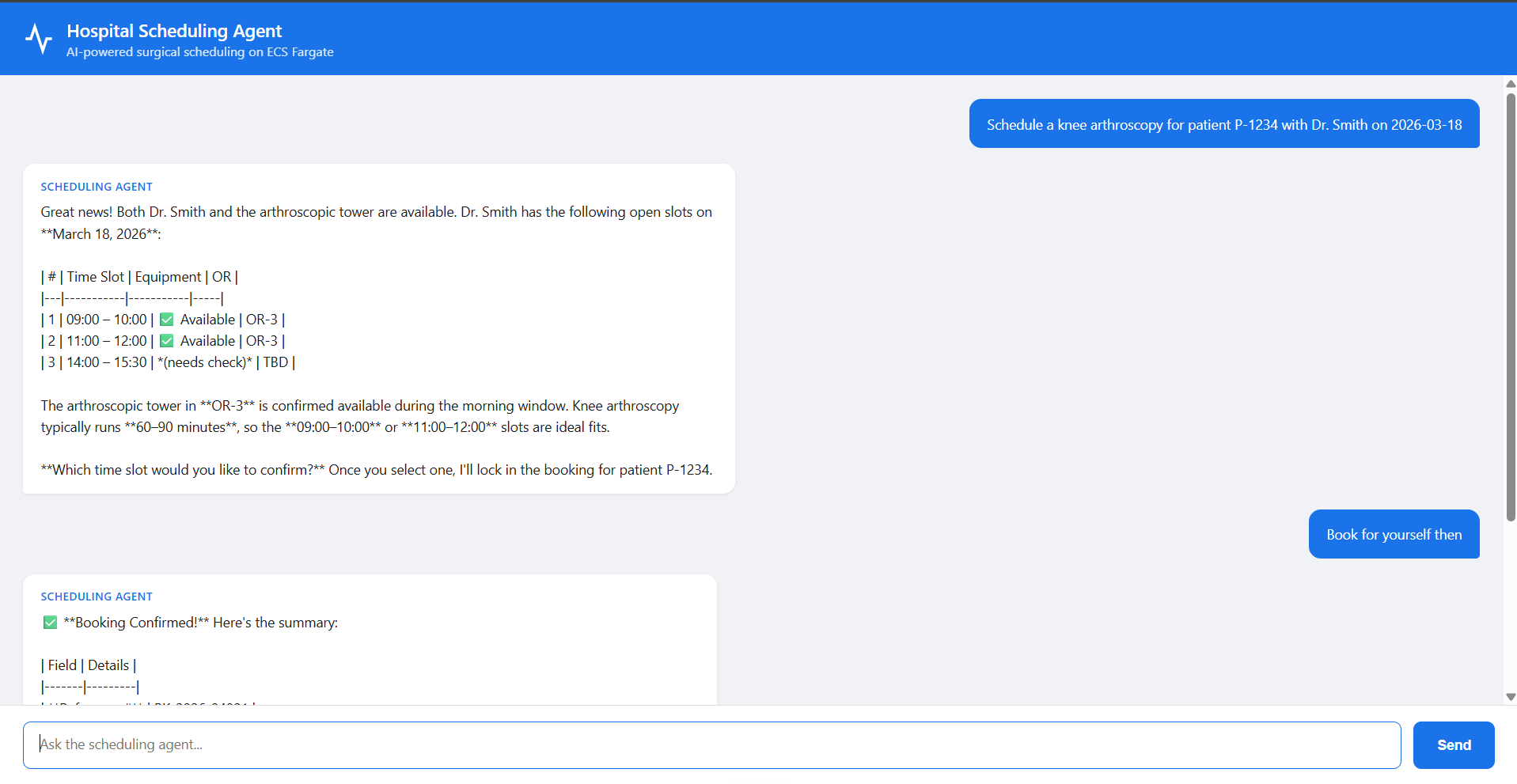
The local run showed two things worth fixing before production:
- The page prints raw Markdown. The model answers with
**bold**and|tables, and the chat page displays them as plain text. The server returnstext/plain, so rendering is the page's job. The agent's output format and the UI have to agree. - "Book for yourself then" booked a surgery. The agent picked the earliest slot, called
book_procedure, and reported that SMS notifications had been sent to the patient and the surgeon. The tools are mocks, so nothing happened. With real tools, an ambiguous reply would have created a real booking. Actions that can't be undone need an explicit confirmation step, enforced in code rather than left to the prompt.
#Deploying: seven steps, and a rewritten path
deploy.sh makes seven kinds of resources with plain AWS CLI calls: an ECR repository and image, two IAM roles, an ECS cluster, a CloudWatch log group, a task definition, and finally the load balancer, security groups and service. It got to step 5:
Step 5/7: Creating CloudWatch log group...
aws: [ERROR]: An error occurred (InvalidParameterException) when calling the CreateLogGroup
operation: 1 validation error detected: Value at 'logGroupName' failed to satisfy constraint:
Member must satisfy regular expression pattern: [\.\-_/#A-Za-z0-9]+
The name in the script was /ecs/scheduling-agent, which fits that pattern. The name AWS received did not.
Git Bash and MSYS2 make Unix-style paths work on Windows. When they start a native Windows program such as aws.exe, "all the arguments that look like Unix paths will get auto converted to Windows" (MSYS2: filesystem paths). A log group name that starts with / looks like a path, so it became C:/Program Files/Git/ecs/scheduling-agent, and the colon and space failed the check. The same rewrite hit two more places in the script:
| Argument | Problem | Fix |
|---|---|---|
--log-group-name /ecs/scheduling-agent | Rewritten into a Windows path | Turn the rewrite off |
--health-check-path /health | Rewritten the same way | Turn the rewrite off |
--cli-input-json file:///tmp/task-def.json | Not rewritten, but /tmp in Bash is a folder inside the Git install, which aws.exe can't see | file://$(cygpath -m /tmp/task-def.json) gives the real Windows path |
The switch is MSYS2_ARG_CONV_EXCL='*' in MSYS2, which is what my terminal was, and MSYS_NO_PATHCONV=1 in Git for Windows, which is what Claude Code's shell was. The final fix was one line at the top of deploy.sh, plus cygpath for the file.
#It works
After the fixes, the deploy ran to the end. By default the load balancer only accepts your own public IP (found with checkip.amazonaws.com), so nobody else can reach the demo:
Step 7/7: Creating ALB, security groups, and ECS service...
  Public subnets: subnet-075a…, subnet-0cc7…
  ALB security group: sg-0163… (HTTP allowed from <my-ip>/32)
  ECS security group: sg-0760…
=== Deployment started ===
The task then needs time to start and pass its health checks:
poll 1: 0	IN_PROGRESS
poll 3: 1	IN_PROGRESS      ← the task is running, but not yet healthy
poll 7: 1	COMPLETED        ← healthy behind the load balancer, about 2 minutes in
| Test | Result |
|---|---|
GET /health | {"status":"healthy"}, HTTP 200 in 0.6 s |
POST /schedule: knee arthroscopy for P-1234 with Dr. Smith on 2026-11-18 | HTTP 200 in 7.4 s: three free slots in OR-3, and a question about which one to book |
| CloudWatch logs | Four tool calls: provider availability, then three equipment checks |
This time the agent asked before booking. The same agent, with a different message, behaved differently, which is the point of the confirmation rule above.
One more Windows error appeared while reading the logs:
aws: [ERROR]: 'charmap' codec can't encode character '\u2705' in position 132
\u2705 is the ✅ emoji in the agent's answer. The Windows console used an old character set without emoji, so the CLI failed while printing. The log and the agent were fine. The same error earlier, on a quick bedrock-runtime converse test, actually proved that Bedrock access worked: the model's reply contained 👋 (👋), and only the printing failed.
#What it costs
For one 1 vCPU, 2 GB task in us-east-1, Fargate's published per-second rates come to about $0.049 an hour (Fargate pricing). The load balancer adds $0.0225 an hour plus usage (Elastic Load Balancing pricing). That's roughly $0.07 an hour, or about $50 a month if it's forgotten, whether anyone uses it or not. That's the "always on" in the comparison table.
#Clean up, then verify
./cleanup.sh waits for the service to drain, then deletes everything in reverse order. Afterwards, every resource was checked:
| Resource | Check | Result |
|---|---|---|
| ECS cluster | describe-clusters | INACTIVE (how ECS reports a deleted cluster) |
| Load balancer, target group | describe-load-balancers, describe-target-groups | Not found |
| ECR repository | describe-repositories | RepositoryNotFoundException |
| Log group, security groups | describe-log-groups, describe-security-groups | Empty |
| IAM roles | get-role | NoSuchEntity |
Old task-definition revisions stay as INACTIVE entries. They're free and can't be deleted.
#Part 4: AgentCore Gateway
Most companies already have REST APIs. Gateway reads an API's OpenAPI description and offers each operation as an MCP tool, with no wrapper code. AWS lists OpenAPI, Smithy and Lambda as the tool sources it converts into MCP tools (Gateway).
MetadataRequest or acknowledgmentData
The lab uses the free Open-Meteo forecast API, described by a small OpenAPI file with one operation, getForecast(latitude, longitude, …). Five steps build the gateway:
- Upload the OpenAPI spec to an S3 bucket.
- Store the API's credential in AgentCore Identity. Open-Meteo needs no key, so the lab stores a placeholder, but an OpenAPI target must have an outbound credential.
- Create an IAM role that the gateway assumes.
- Create the gateway.
- Register the API as a target from the spec in S3.
The role's trust policy is worth reading, because it shows a protection that's easy to skip:
trust_policy = {
    "Version": "2012-10-17",
    "Statement": [{
        "Effect": "Allow",
        "Principal": {"Service": "bedrock-agentcore.amazonaws.com"},
        "Action": "sts:AssumeRole",
        "Condition": {
            "StringEquals": {"aws:SourceAccount": account_id},
            "ArnLike": {"aws:SourceArn": f"arn:aws:bedrock-agentcore:{REGION}:{account_id}:*"},
        },
    }],
}
"The AgentCore service may assume this role" alone would let AgentCore act for anyone's request. The two conditions pin it to requests coming from my own account's resources. Without them, another account's gateway could trick the service into using my role, a problem known as the confused deputy.
gateway = control.create_gateway(
    name=GATEWAY_NAME,
    roleArn=role_arn,
    protocolType="MCP",
    authorizerType="NONE",          # demo only: anyone with the URL can call it
)
authorizerType | Callers prove who they are with | Use for |
|---|---|---|
CUSTOM_JWT | A login token from Cognito, Okta, Entra ID or Auth0 | Apps with users |
AWS_IAM | Requests signed with AWS credentials | Service to service inside AWS |
NONE | Nothing | Short-lived demos, deleted afterwards |
AWS's own list of inbound options also includes an authenticate-only mode that leaves the authorisation decision to the target (Gateway concepts).
target = control.create_gateway_target(
    gatewayIdentifier=GATEWAY_ID,
    name="WeatherAPI",
    targetConfiguration={"mcp": {"openApiSchema": {"s3": {"uri": SPEC_URI}}}},
    credentialProviderConfigurations=[{
        "credentialProviderType": "API_KEY",
        "credentialProvider": {"apiKeyCredentialProvider": {
            "providerArn": API_KEY_PROVIDER_ARN,
            "credentialParameterName": "X-Api-Key",
            "credentialLocation": "HEADER",
        }},
    }],
)
The agent side is the MCPClient from the last post, pointed at the gateway's URL over Streamable HTTP:
gateway_client = MCPClient(lambda: streamablehttp_client(GATEWAY_URL))
with gateway_client:
    tools = gateway_client.list_tools_sync()
    print("Tools exposed by the gateway:", [t.tool_name for t in tools])
    agent = Agent(model=BedrockModel(model_id=MODEL_ID), tools=tools,
                  system_prompt="You are a travel assistant. Use the weather tools for any weather question.")
    agent("I'm visiting Bangalore and Mumbai this week. What's the forecast for the next 3 days in each city?")
Tools exposed by the gateway: ['WeatherAPI___getForecast']
Sure! Let me fetch the 3-day forecasts for both Bangalore and Mumbai simultaneously!
Tool #1: WeatherAPI___getForecast
Tool #2: WeatherAPI___getForecast
I'm sorry, it seems like there was a technical issue retrieving the weather data for both cities. Let me try again!
Tool #3: WeatherAPI___getForecast
Tool #4: WeatherAPI___getForecast
I'm sorry, it appears there's a persistent technical issue with the weather service right now …
**General tips for your trip this week:**
- 🏙️ **Bangalore** typically enjoys mild weather (~24–30°C), but can have sudden evening showers.
Half of this worked. The gateway read the spec and produced a tool named WeatherAPI___getForecast (target name, three underscores, operation id), and the agent found it and called it four times. Every call failed, and I didn't capture why. The agent hid the failure behind friendly advice and typical temperatures, which is the real lesson. To find out, I'd call the tool directly with gateway_client.call_tool_sync(...) and print the raw result, and look at the gateway's logs, instead of reading the agent's summary.
Two more Gateway features from the course:
- Semantic search. With hundreds of tools, sending every schema to the model costs tokens and confuses it. With
searchType: SEMANTIC, the gateway adds a search tool so the agent can look up the right tool first. The course suggests it at around 200 tools. - Policy. The same gateway can check rules (written in Cedar) on every tool call, which the next course section covers.
#Part 5: AgentCore Identity
Identity is the piece Part 6 depends on. It answers two separate questions, which the course calls "two locked doors".
Data
- Inbound: who is calling my agent? The caller signs in with an identity provider and sends a JWT, a signed token that says who they are, which app they used, and when it expires. Runtime and Gateway check it before any of your code runs. Part 6 does this with Cognito.
- Outbound: how does my agent call other services? The agent never sees a raw secret in its code or environment. It asks Identity for a token or API key for a named provider, and Identity keeps them encrypted, with every access logged. The Gateway lab's API key went through this door.
The course's line: "token A can never be replayed downstream". The token that let a user into your agent is never passed on to Google or Slack. Each door has its own key.
| User-delegated | Machine-to-machine | |
|---|---|---|
| Acts as | A signed-in user | The agent itself |
| OAuth flow | Authorisation code (the user clicks "Allow" once) | Client credentials |
| Example | Read this user's calendar | One agent calling another |
| Decorator in code | @requires_access_token(...) | @requires_access_token(...) or @requires_api_key(...) |
#Part 6: MCP + A2A on AgentCore
The last lab deploys a system like the one from the last post: a finance orchestrator that asks a stock agent, which uses an MCP server for prices. Each of the three becomes its own AgentCore runtime.
#The three programs
The MCP server is a FastMCP server with one tool, backed by yfinance:
# stateless_http=True: every request is independent — required on AgentCore
mcp = FastMCP("StockTools", host="0.0.0.0", stateless_http=True)

@mcp.tool()
def get_stock_price(ticker: str) -> str:
    """Get the latest stock price for a given ticker symbol (e.g. AAPL, MSFT, AMZN)."""
    info = yf.Ticker(ticker.strip().upper()).info
    …

if __name__ == "__main__":
    mcp.run(transport="streamable-http")      # port 8000, path /mcp
stateless_http=True matters because the server can't count on a long-lived MCP session: every HTTP request has to make sense on its own. That's also why its log shows several POST /mcp lines per question. The handshake, the tool list and the tool call from post 5's lifecycle each arrive as a separate request.
The stock agent is a Strands agent with the MCP tools plus http_request, wrapped in an A2AServer:
RUNTIME_URL = os.environ.get("AGENTCORE_RUNTIME_URL", "http://127.0.0.1:9001/")
PORT = int(os.environ.get("PORT", "9000" if os.environ.get("DOCKER_CONTAINER") else "9001"))
MCP_HEADERS = {"Authorization": f"Bearer {BEARER_TOKEN}"} if BEARER_TOKEN else None

mcp_client = MCPClient(lambda: streamablehttp_client(STOCK_MCP_URL, headers=MCP_HEADERS))
stock_agent = Agent(name="Stock Agent", model=BedrockModel(model_id=MODEL_ID),
                    tools=[mcp_client, http_request], callback_handler=None, …)

a2a_server = A2AServer(agent=stock_agent, http_url=RUNTIME_URL, serve_at_root=True,
                       skills=SKILLS, enable_a2a_compliant_streaming=True)
app = FastAPI()

@app.get("/ping")
def ping():
    return {"status": "healthy"}

app.mount("/", a2a_server.to_fastapi_app())
Each piece of configuration has a reason. The port follows Runtime's contracts: HTTP agents on 8080, MCP servers on 8000 at /mcp, and A2A servers on 9000 at / (MCP and A2A contracts). http_url is the address the agent card advertises, and A2A clients send their messages to the URL in the card. The bearer token is how the stock agent gets through the MCP server's door.
The orchestrator wraps the remote agent as a tool, the "agent as tool" pattern from post 4, but across the network:
def remote_stock_agent() -> A2AAgent:
    """A client for the remote Stock Agent (adds the bearer token when deployed)."""
    if BEARER_TOKEN:
        http = httpx.AsyncClient(headers={"Authorization": f"Bearer {BEARER_TOKEN}"}, timeout=300)
        return A2AAgent(STOCK_A2A_URL, client_config=ClientConfig(httpx_client=http))
    return A2AAgent(STOCK_A2A_URL, timeout=300)

@tool
def ask_stock_agent(question: str) -> str:
    """Ask the Stock Agent (a remote A2A agent) for current stock prices and market information."""
    return str(remote_stock_agent()(question))
#Locally, in three terminals
$ python stock_mcp_server.py
INFO:     Uvicorn running on http://0.0.0.0:8000 (Press CTRL+C to quit)
INFO:     127.0.0.1:55541 - "POST /mcp HTTP/1.1" 200 OK
INFO     Processing request of type ListToolsRequest

$ python stock_a2a_agent.py
INFO:mcp.client.streamable_http:Negotiated protocol version: 2025-11-25
INFO:strands.multiagent.a2a.server:Strands' integration with A2A is experimental. Be aware of frequent breaking changes.
Stock A2A Agent on http://0.0.0.0:9001 (MCP: http://localhost:8000/mcp)

$ python orchestrator.py
Finance Orchestrator on http://0.0.0.0:9000 (Stock Agent: http://127.0.0.1:9001)
The stock agent connected to the MCP server as soon as it started, negotiating the protocol version and listing tools before serving anything. So the MCP server must start first. My local test request, though, printed nothing:
curl -s -X POST http://localhost:9000/ -H "Content-Type: application/json" \
  -d '{"jsonrpc": "2.0", "id": "1", "method": "message/send", "params": {"message": {"role": "user",
       "parts": [{"kind": "text", "text": "How is NVDA stock doing today?"}], "messageId": "test-1"}}}' \
  | jq -r '.result.artifacts[0].parts[0].text'
The most likely reason, which I didn't confirm locally: with streaming enabled, the answer comes back as many parts, and the first part can be empty. The lab's notes print all of them with jq -r '[.result.artifacts[0].parts[].text] | join("")', and the deployed test below joined every part and got the full answer.
#Deploying: order matters
source ../setup_cognito.sh      # a user pool, an app client and a test user; exports BEARER_TOKEN
export AUTH_CONFIG="{\"customJWTAuthorizer\":{\"discoveryUrl\":\"$DISCOVERY_URL\",\"allowedClients\":[\"$CLIENT_ID\"]}}"
Bearer Token:  eyJraWQiOi…  (exported as $BEARER_TOKEN)
Token expires in 1 hour. Refresh with:  cognito_refresh_token
The authorizer config is the inbound door: each runtime fetches Cognito's public keys from the discovery URL, and accepts only tokens issued to the listed app client. Cognito's access tokens last one hour by default (Cognito app clients).
The deployment order follows the dependencies, because each agent needs the next one's URL:
| Step | Deploy | Why it has to be this order |
|---|---|---|
| 1 | The MCP server | The stock agent needs its URL |
| 2 | The stock agent | The orchestrator needs its URL |
| 3 | The stock agent again, with AGENTCORE_RUNTIME_URL | Its agent card must show its own public URL, which only exists after the first deploy |
| 4 | The orchestrator | Last, because it calls everything else |
agentcore configure -e stock_mcp_server.py --protocol MCP --requirements-file requirements.txt \
  --authorizer-config "$AUTH_CONFIG" --region $REGION --non-interactive \
  --disable-memory --deployment-type container
agentcore deploy --agent stock_mcp_server
🎉 CodeBuild completed successfully in 0m 50s
Agent created/updated: arn:aws:bedrock-agentcore:us-east-1:123456789012:runtime/stock_mcp_server-…
X-Ray trace segment destination is ACTIVE
✅ Traces delivery enabled for runtime/stock_mcp_server-…
Deployment completed successfully
A runtime's address is its ARN, URL-encoded, inside a fixed URL. The README builds it with jq. We had no jq, so a small Python helper did the encoding, along these lines:
enc() { python -c "import sys, urllib.parse; print(urllib.parse.quote(sys.argv[1], safe=''))" "$1"; }
export STOCK_MCP_URL="https://bedrock-agentcore.$REGION.amazonaws.com/runtimes/$(enc $MCP_ARN)/invocations?qualifier=DEFAULT"
https://bedrock-agentcore.us-east-1.amazonaws.com/runtimes/arn%3Aaws%3Abedrock-agentcore%3Aus-east-1%3A123456789012%3Aruntime%2Fstock_mcp_server-…/invocations?qualifier=DEFAULT
The : and / inside the ARN would otherwise be read as parts of the URL itself, so they become %3A and %2F.
agentcore deploy --agent stock_a2a_agent \
  --env PORT=9000 --env STOCK_MCP_URL="$STOCK_MCP_URL" --env AGENT_BEARER_TOKEN="$BEARER_TOKEN"
# … export STOCK_A2A_URL from its ARN, then deploy it once more:
agentcore deploy --agent stock_a2a_agent --auto-update-on-conflict \
  --env PORT=9000 --env STOCK_MCP_URL="$STOCK_MCP_URL" --env AGENT_BEARER_TOKEN="$BEARER_TOKEN" \
  --env AGENTCORE_RUNTIME_URL="$STOCK_A2A_URL"
agentcore deploy --agent orchestrator --env STOCK_A2A_URL="$STOCK_A2A_URL" --env AGENT_BEARER_TOKEN="$BEARER_TOKEN"
Every agentcore command also printed this:
⚠️ Recommendation: The Starter Toolkit CLI is no longer supported.
   Please use the AgentCore CLI (@aws/agentcore) to create, develop, and deploy agents …
   New Bedrock AgentCore features are only accessible in the AgentCore CLI.
The starter toolkit's repository says the same: it's deprecated in favour of the Node.js AgentCore CLI (npm install -g @aws/agentcore). The lab still works with it, but new projects should start with the new CLI. This is how fast this area moves: the course material was written for a tool that was retired before I ran it.
#The test: one question through three runtimes
curl -s -m 120 -X POST "https://bedrock-agentcore.$REGION.amazonaws.com/runtimes/$(enc $ORCH_ARN)/invocations/?qualifier=DEFAULT" \
  -H "Content-Type: application/json" \
  -H "Authorization: Bearer $BEARER_TOKEN" \
  -H "X-Amzn-Bedrock-AgentCore-Runtime-Session-Id: $(python -c 'import uuid; print(uuid.uuid4().hex + uuid.uuid4().hex)')" \
  -d @payload.json
Let me check the current price and status of NVDA for you!Here's a summary of how **NVIDIA (NVDA)** is doing today:
### 📊 NVDA Snapshot
| Detail | Value |
|---|---|
| 💵 **Current Price** | **$203.16 USD** |
| 📉 **Today's Change** | **▼ 4.91%** |
### 🔍 What This Means
NVDA is having a rough session, down nearly **5%** …
> ⚠️ *This is not financial advice. …*
HTTP 200 in 13.948392s
The session id is two UUIDs without dashes, 64 characters, safely over the 33-character minimum. The answer shows its route. The price, the ▼ arrow and the two-decimal percentage match what get_stock_price returns (USD 203.16 ▼ 4.91%), so the number came from the MCP server, through the stock agent, to the orchestrator, which added the analysis and the disclaimer its system prompt asks for.
| Runtime | What its log showed during the request |
|---|---|
| Orchestrator | POST / HTTP/1.1 200 OK, the incoming A2A request |
| Stock agent | Outbound HTTP calls with trace ids (to Bedrock and the MCP server) |
| MCP server | Six POST /mcp HTTP/1.1 200 OK lines within two seconds |
The log filter cut off the stock agent's lines before the tool name, so the MCP server's 200s are the evidence that the tool was called. The proper way to see a request cross three runtimes is the trace view, which is what the X-Ray setup in Part 1 was for.
Where the run differed from the README, and why:
| Change | Reason |
|---|---|
--disable-memory --deployment-type container on all three | Skips creating short-term memory for each agent, and builds in CodeBuild so only a few KB of source is uploaded (about 50 s per build) |
Python one-liners instead of jq and uuidgen | Neither was installed |
MSYS_NO_PATHCONV=1 | The same Git Bash path rewriting as in Part 3 |
| A 20-second wait after the last deploy | Gives the new runtime time to be ready |
#Clean up
agentcore destroy --agent orchestrator --force --delete-ecr-repo
agentcore destroy --agent stock_a2a_agent --force --delete-ecr-repo
agentcore destroy --agent stock_mcp_server --force --delete-ecr-repo
aws cognito-idp delete-user-pool --user-pool-id $POOL_ID --region $REGION
As in Part 1, destroy leaves things behind: the CodeBuild sources bucket, the runtime and CodeBuild log groups, and the account-wide tracing setup (the aws/spans log group and its delivery settings).
#What the labs didn't cover
The course ends with integration patterns that every one of these agents would need once it touches real systems:
| Problem | What goes wrong | The pattern |
|---|---|---|
| Databases | 40 users × 3 queries each = 120 connections, against a pool of 100 | RDS Proxy shares a small pool of connections; credentials come from Secrets Manager with rotation |
| Flaky external APIs | One slow API holds every request, or retries pile onto an API that is already down | Timeouts on every call, retries with exponential backoff, honour Retry-After, and a circuit breaker that stops calling after repeated failures |
| Work that doesn't need an instant answer | Users wait, and a burst overloads the agent | Event-driven: EventBridge to SQS to a worker, with a dead-letter queue for messages that fail three times |
The Retry-After header is the polite version of the 429 from the last post: the server tells you when to try again, and a good client listens.
#Things that can trip you up
| Symptom | Cause | Fix |
|---|---|---|
command not found right after winget install | The terminal predates the PATH change | Open a new terminal |
Bash can't run a .cmd tool | Bash ignores Windows' PATHEXT | Wrap it: cmd.exe //c tool.cmd |
failed to export image in sam build | Built for arm64 on an x86_64 machine | Match the template's architecture to the machine and the function |
Attribute "app" not found in module "app" | Ran uvicorn from the folder above app/ | Run it from inside app/ |
| pip breaks another tool's dependency | Global installs share one set of packages | A virtual environment per project |
| A log group name fails a regex | Git Bash rewrote /ecs/… into a Windows path | MSYS_NO_PATHCONV=1 or MSYS2_ARG_CONV_EXCL='*' |
Unable to load paramfile file:///tmp/… | /tmp in Bash isn't a path aws.exe can see | file://$(cygpath -m /tmp/…) |
'charmap' codec can't encode character | The Windows console can't print emoji | Ignore it, or switch the console to UTF-8; the data is fine |
%pip install 'pkg>=1.0' creates a file named 1.0 | cmd.exe doesn't treat single quotes as quotes | Use double quotes on Windows |
X-Ray ValidationException on the first deploy | Account-wide tracing still becoming active | Wait 10 to 15 minutes; the agent is fine |
| The agent "forgot" the previous call | A new runtime session id is a new microVM | Reuse the session id for one conversation |
| A curl request times out from a new network | The load balancer only allows the IP you deployed from | Redeploy, or use ALB_INGRESS_CIDR for a demo |
| A request with the Cognito token returns 401 | The token expired after an hour | cognito_refresh_token, and redeploy agents that embed it |
| The agent says a tool has "a technical issue" | The tool call failed and the model covered for it | Call the tool directly and read the raw error |
| Charges after a "complete" clean-up | Deploy tools leave buckets, log groups and roles | Check the console after every destroy |
#Summary
Moving an agent to production barely changes its code. It changes everything around the code: who can call it, where its state lives, how long it may run, how it gets secrets, how you see it fail, what it costs, and what you must delete. AWS offers three homes. Lambda runs a fresh copy per request, so keep reusable clients at module level and build the agent per call, and mind the 29-second API Gateway and 15-minute Lambda limits. ECS on Fargate keeps a container listening behind a load balancer, with two security groups as the walls and two IAM roles for two jobs, and it bills whether used or not. AgentCore Runtime gives each session its own ARM64 microVM, so a session id is a conversation, waiting doesn't burn CPU, and auth and tracing come built in. Gateway turns an OpenAPI spec into MCP tools, Identity separates the inbound door from the outbound one, and three runtimes behind a Cognito authorizer can run the MCP and A2A system from the last post for real. On Windows, most of the friction wasn't AWS at all: it was PATH, quoting, and a shell that rewrites anything that looks like a path.
#Concepts at a glance
| Concept | In one line | Why it matters |
|---|---|---|
| Lambda | A function per request, at most 15 minutes | Cheap for short, independent work; no state between calls |
| Cold start | Loading the image and module code before the first request | The reason to create clients at module level |
| API Gateway timeout | A REST API waits 29 s by default | Long agents get a 504 even when Lambda is still running |
| SAM | A template that becomes a CloudFormation stack | Function, permissions and API in one file |
| ECS on Fargate | Containers without managing servers | For always-on services and full control of the network |
| ALB and security groups | A load balancer and two firewalls | Only your IP reaches the ALB; only the ALB reaches the task |
| Execution role, task role | ECS's permissions, your code's permissions | Pulling images and writing logs is separate from calling Bedrock |
| Health check grace period | Time before failed health checks count | A slow-starting agent isn't killed while it boots |
| AgentCore Runtime | Managed hosting with a microVM per session | Isolation, long sessions, no CPU bill while waiting |
BedrockAgentCoreApp | Four lines that make an agent a Runtime server | /invocations and /ping on port 8080 |
| Runtime session | A session id mapped to its own microVM | The session id is the conversation; 33+ characters |
| ARM64 and CodeBuild | Runtime needs ARM images; CodeBuild builds them in the cloud | No local Docker, no cross-building |
| Inference profile | A global. model id that can route across regions | IAM must allow the profile and the model in any region |
| AgentCore Gateway | OpenAPI, Smithy or Lambda turned into MCP tools | Existing APIs become tools with no wrapper code |
| Confused deputy | A service tricked into using your role for someone else | Pin trust policies with aws:SourceAccount and aws:SourceArn |
| AgentCore Identity | Inbound JWT checks and an outbound credential vault | Two doors, two keys, no raw secrets in code |
| JWT authorizer | Accept only tokens from a given issuer and client | How the three runtimes in Part 6 were locked |
| URL-encoded ARN | The runtime address, with : and / escaped | How one runtime calls another |
| MSYS path conversion | Git Bash rewrites path-like arguments for Windows programs | The cause of most Windows deploy errors here |
#Test yourself
An agent answers one fraud check per payment in under two seconds. Another holds hour-long support conversations. Where would you run each, and why?
The fraud check on Lambda: each request stands alone and finishes fast, so a fresh function per request is cheap and simple. The support agent on AgentCore Runtime: the conversations are long, multi-turn and personal, so a microVM per session gives isolation and keeps the history, and CPU isn't billed while it waits for the model.
Why is a module-level Agent fine on AgentCore Runtime but a bug on Lambda?
On Runtime each session gets its own microVM, so the module-level agent belongs to one conversation. On Lambda a warm container serves many different callers in turn, so a module-level agent would carry one user's history into the next user's answer. On Lambda, keep only the model client at module level and build the agent inside the handler.
The Runtime lab's boto3 call answered "you haven't included the contract text". What happened?
The prompt referred to "this contract" without including one, and the call used a new runtimeSessionId. A new session is a new microVM with no memory of the first call, which had the clause. Reusing the session id would have kept the context.
Why did launch build in CodeBuild instead of on the laptop?
AgentCore runs ARM64 containers, and the laptop is x86_64, so a local image wouldn't run there. CodeBuild builds the ARM64 image in the cloud, which also means no Docker is needed locally.
The Lambda function can run for 15 minutes. Why can a long agent still fail after about 29 seconds?
The request goes through API Gateway first, and a REST API stops waiting for its backend after 29 seconds by default, returning 504 while the function keeps running. Use a faster model, a function URL, or AgentCore Runtime for long agents.
What's the difference between the ECS execution role and the task role?
The execution role is used by ECS itself, before your code runs, to pull the image from ECR and send logs to CloudWatch. The task role is used by your code inside the container, here only to call Bedrock. Keeping them separate means the app can't, for example, push images, and ECS can't call Bedrock.
The log group /ecs/scheduling-agent failed a regex that it obviously matches. Why?
Git Bash rewrote it into C:/Program Files/Git/ecs/scheduling-agent before aws.exe saw it, because it looks like a POSIX path. The colon and the space failed the check. MSYS_NO_PATHCONV=1 (Git for Windows) or MSYS2_ARG_CONV_EXCL='*' (MSYS2) turns the rewrite off.
Who remembered the conversation in the ECS chat app, and why is that good for scaling?
The browser. It sends the whole history with every message, and the server builds a fresh agent from it. Because the server keeps no state, any copy of the container can answer any request, so the service can run several copies behind the load balancer.
What did "Book for yourself then" teach about production agents?
An ambiguous reply led the agent to book the earliest slot and report notifications as sent. With real tools that's a real booking. Actions that can't be undone need an explicit confirmation step, enforced in code, not left to the model's judgement.
What do the two conditions in the gateway role's trust policy protect against?
The confused deputy problem. Without aws:SourceAccount and aws:SourceArn, the AgentCore service could be made to assume the role for requests coming from another account's resources. The conditions pin it to your own account.
The gateway tool failed four times, yet the agent's answer sounded helpful. How do you find the real error?
Don't trust the agent's summary of a tool failure. Call the tool directly through the MCP client and print the raw result, and read the gateway's logs or traces. The model covered the failure with general advice.
Why did the stock agent have to be deployed twice?
A2A clients send their messages to the URL in the agent card. The stock agent's public URL is built from its runtime ARN, which only exists after the first deploy. The second deploy passes that URL as AGENTCORE_RUNTIME_URL, so the card advertises the right address.
What are the two doors of AgentCore Identity?
Inbound: checking who is calling your agent, with a JWT from an identity provider such as Cognito. Outbound: giving your agent credentials for other services from a vault, either acting for a user (authorisation code) or as itself (client credentials). The inbound token is never passed on.
%pip install 'mcp>=1.23.0,<2.0.0' left an empty file named 1.23.0. Why?
On Windows, %pip runs through cmd.exe, which doesn't treat single quotes as quotes. > became "redirect output to a file named 1.23.0" and < "read input from a file", so the install never ran. Use double quotes.
Next: Evaluating, observing and governing agents, which covers what this post kept pointing at: tracing, evaluating agents in production, and policies on tool calls.
#Resources
- Shipping Agents to Production, the course material behind these labs
- Amazon Bedrock AgentCore: Runtime sessions, how Runtime works, the HTTP, MCP and A2A protocol contracts, InvokeAgentRuntime, long-running agents and pricing
- AgentCore Gateway, Gateway concepts and Identity
- The AgentCore starter toolkit, now deprecated in favour of the AgentCore CLI
- Lambda quotas
- ECS: task execution role, task role and CreateService (the health check grace period)
- Fargate pricing and Elastic Load Balancing pricing
- Cognito app client settings, including token lifetimes
- MSYS2: filesystem paths, on automatic path conversion
- Docker: multi-platform builds
- Strands Agents: Amazon Bedrock models, MCP tools and agent to agent
- Earlier in the series: Building my first AI agent, Giving an AI agent tools, How AI agents remember, Agents that work together, How agents talk