AI & LLMs/Agentic AI · Part 3 of 8
·45 min read
How AI agents remember: Mem0, LangGraph and AgentCore Memory
A first-timer's guide to agent memory: long-term facts with Mem0 and FAISS, short-term conversation state with LangGraph checkpointing, and every block of code explained.
LLMs are stateless by default. If you end a chat session and start a new one, the model has no memory of the earlier conversation. The only "memory" it ever has is whatever text is put back into its prompt. Memory, for an agent, is the machinery that puts the right information back into the prompt at the right time.
Without memory, every interaction feels transactional. With memory, an agent can keep track of what you asked a while ago, keep important facts across sessions, adapt to your preferences and stay on track in long-running work.
| Feature | Agents without memory | Agents with memory |
|---|---|---|
| Context | Reset every time a session ends | Carried forward across sessions |
| Personalisation | Low; generic responses | High; tailored to the user's history |
| Efficiency | User must repeat information | Agent remembers and builds on past information |
| User experience | Feels like talking to a stranger every time | Feels like a continuous relationship with an assistant |
This builds on my first agent and on giving an agent tools, where a model, a few tools and a loop were enough to make something that acts. Here we give agents memory in two different ways, and then combine them:
- Part 1: long-term memory with Mem0, on a Strands agent.
- Part 2: short-term memory by saving a LangGraph agent's state into Amazon Bedrock AgentCore Memory.
- Part 3: how the two fit together.
Both parts use a model hosted on Groq. Any idea that is likely to be new is explained in plain language before the code that uses it, and every code block has comments.
#Two kinds of memory
Agents solve the "stateless" problem in two different ways, and it helps to keep them apart from the start.
| Short-term memory | Long-term memory | |
|---|---|---|
| What is stored | The full message history of one conversation | Facts and preferences pulled out of conversations |
| Lifetime | One session or thread | Across sessions, days, weeks |
| Question it answers | "What did I just ask you?" | "What do you know about me?" |
| Built in this post with | LangGraph checkpointing and AgentCore Memory (Part 2) | Mem0 with a local FAISS index (Part 1) |
#Part 1: Long-term memory with Mem0
In this exercise we build personal assistant agents that remember each user's preferences across conversations. Mem0 is the long-term memory, and a web search tool supplies fresh information.
#What is Mem0?
Mem0 (pronounced "mem-zero") is an open-source memory layer. It gives an otherwise stateless model a persistent store of facts about a user, so the agent can recall them in later sessions.
It works in four moves:
- Add: you pass in a conversation. Mem0 uses an LLM to extract the facts worth keeping, such as dietary preferences or working location, instead of storing the raw transcript.
- Store: the facts go into a vector store, so they can be searched by meaning. Mem0 can optionally add a graph store to capture relationships between things.
- Update: when a new fact contradicts an old one, Mem0 can update or delete the old memory instead of piling up duplicates.
- Search: before each model call, search with the user's message, take the top few matching memories and put them in the prompt.
DataRequest or acknowledgment
#Embeddings, FAISS and fastembed
The word "searched by meaning" hides three ideas that are worth understanding before the code.
Embeddings. An embedding is a list of numbers that captures the meaning of a piece of text. Texts with similar meaning get lists that are close together, and texts with different meaning end up far apart. This is how "Suggest a restaurant" can land near "I'm vegetarian", even though they share no words.
FAISS. FAISS (Facebook AI Similarity Search) is an open-source library from Meta for fast similarity search over vectors. It is the "vector store" Mem0 uses here. A FAISS index is the data structure that holds all the vectors and answers the question "which stored vectors are nearest to this one?" quickly.
fastembed. Something has to turn text into those numbers. If you were on Amazon Bedrock, the course notebook would use Titan embeddings. Groq has no embeddings API, so here the embeddings run on your own machine with fastembed, a lightweight library from Qdrant. It runs small pretrained models through ONNX Runtime on the CPU, so it needs no GPU and no PyTorch.
Put together, when a user says "I'm vegetarian":
- The Groq LLM extracts the fact.
- fastembed converts that sentence into a vector with 1024 numbers.
- The vector is stored in the FAISS index.
- Later, a query like "Suggest a restaurant" is embedded by fastembed too, and FAISS finds the nearest stored vector.
#Set up the environment
Install the dependencies first. %pip is a notebook command that installs into the notebook's own Python, -q keeps the output quiet and -r reads the package list from a file.
%pip install -q -r requirements-groq.txt
Then the setup cell. Four of its imports are part of Python's standard library, and only dotenv has to be installed.
| Import | Package | What it does here |
|---|---|---|
os | standard library | Reads and sets environment variables, and works with paths |
re | standard library | Regular expressions, used later to clean up user IDs |
shutil | standard library | File operations; shutil.rmtree deletes a whole folder |
warnings | standard library | Hides noisy library warnings so the output stays clean |
dotenv | python-dotenv | Loads KEY=value lines from a .env file into the environment |
import os
import re
import shutil
import warnings

warnings.filterwarnings("ignore")  # hide noisy library warnings

# Loads variables from a .env file into the environment.
from dotenv import load_dotenv

load_dotenv()  # reads GROQ_API_KEY from a .env file, if present

# Which Groq model to use. Falls back to gpt-oss-120b if GROQ_MODEL_ID isn't set.
MODEL_ID = os.getenv("GROQ_MODEL_ID", "openai/gpt-oss-120b")

# Mem0 uses two models: a small LLM that extracts facts from what the user says
# (on Groq), and an embedding model that indexes memories (local; see
# "A local embedder for Mem0" below).
os.environ.setdefault("MEM0_LLM_PROVIDER", "groq")
os.environ.setdefault("MEM0_LLM_MODEL", "openai/gpt-oss-20b")

# Skip the interactive "are you sure?" prompt when the agent stores memories
os.environ["BYPASS_TOOL_CONSENT"] = "true"

# Turn off Mem0's anonymous usage telemetry
os.environ["MEM0_TELEMETRY"] = "False"

# Keep Mem0's history database inside this course folder
os.environ["MEM0_DIR"] = os.path.abspath(".mem0_course")

# Start from a clean slate: the memory tool's local FAISS index and this course's Mem0 data
shutil.rmtree("/tmp/mem0_384_faiss", ignore_errors=True)
shutil.rmtree(os.environ["MEM0_DIR"], ignore_errors=True)
# Recreate the folder right away. Mem0 only creates it when it is first imported,
# so without this line, re-running this cell in the same kernel would leave Mem0
# with nowhere to put history.db ("unable to open database file").
os.makedirs(os.environ["MEM0_DIR"], exist_ok=True)
print("Ready")
load_dotenv() is the key line for secrets. It reads the .env file and puts each line into os.environ, so os.getenv("GROQ_API_KEY") works as if you had set the variable in your shell. If there is no .env file, it quietly does nothing. Add .env to .gitignore so your key never reaches git.
Two kinds of assignment appear in this cell:
os.environ.setdefault(...)sets a value only if it isn't already set, so you can override it from outside.os.environ[...] = ...always overwrites.
What the cleanup lines do:
/tmp/mem0_384_faissis where the Strands Mem0 tool keeps its FAISS index. Don't read the384in that folder name as the vector size: this notebook's embeddings have 1024 dimensions.- Deleting it means the agent starts with no memories, so earlier runs can't leak into your demo.
- The next line deletes
MEM0_DIR, which holds Mem0's own data, including its history database. Clearing both keeps the vectors and the history in sync, and clearing only one would leave memories without their history, or the reverse.
#Imports and the Groq model
# DDGS = DuckDuckGo Search client (the `ddgs` package). Free web search with no API key.
# This is what gives the agent its "websearch" ability.
from ddgs import DDGS

# Agent: the class that runs the agent loop (model -> tool call -> result -> model).
# tool:  decorator that turns a plain Python function into a tool the agent can call.
from strands import Agent, tool

# Adapter that talks to any OpenAI-compatible API. Groq speaks that protocol,
# so this one class works for Groq by changing only base_url and api_key.
from strands.models.openai import OpenAIModel

# Controls how the agent runs tool calls when the model asks for several at once.
# "Sequential" means one after another, not in parallel. That is safer here because
# memory reads and writes share one local file, and it is gentler on Groq's rate limits.
from strands.tools.executors import SequentialToolExecutor

# Wraps a Python function plus a tool spec (name, description, input schema) into a tool
# object. Used when you want to build a tool by hand instead of with @tool.
from strands.tools.tools import PythonAgentTool

# The ready-made description of the Mem0 memory tool (what it is called, what actions it
# offers, what arguments it takes). Renamed on import so it reads clearly in your code.
from strands_tools.mem0_memory import TOOL_SPEC as MEM0_TOOL_SPEC

# Mem0MemoryTool:    the function that runs when the agent uses memory, i.e. store,
#                    retrieve or list memories.
# Mem0ServiceClient: the client class that connects to Mem0. It is imported here, but
#                    the code in this post never calls it directly.
from strands_tools.mem0_memory import Mem0MemoryTool, Mem0ServiceClient

# The LLM the agent will use, reached through Groq's OpenAI-compatible endpoint
model = OpenAIModel(
    client_args={
        "api_key": os.environ["GROQ_API_KEY"],
        "base_url": os.getenv("GROQ_BASE_URL", "https://api.groq.com/openai/v1"),  # or a local OpenAI-compatible server
        "max_retries": 5,  # retry dropped connections (the client default is 2)
    },
    model_id=MODEL_ID,
    # Groq reasoning models stream their thinking by default; hide it so only the answer prints.
    params={"extra_body": {"include_reasoning": False}},
)
Which pip package each import comes from:
| Import | Package to install | Role |
|---|---|---|
ddgs | ddgs | Web search |
strands | strands-agents | Core agent framework |
strands_tools | strands-agents-tools | Prebuilt tools, including Mem0 memory |
Setting os.environ["GROQ_API_KEY"] with square brackets raises an error straight away if the key is missing. That is a clear early failure, unlike os.getenv, which would quietly return None.
#A local embedder for Mem0
Mem0 accepts any LangChain Embeddings object, so a few lines wrap fastembed in that interface. We pick mixedbread-ai/mxbai-embed-large-v1, a larger and more accurate English embedding model with 1024 dimensions, to match what the memory tool's index expects. The resulting MEM0_CONFIG is passed to every Mem0 client in the notebook.
langchain_core is the small base package of LangChain. It supplies the Embeddings interface here, and Part 2 explains the wider LangChain family.
# TextEmbedding: FastEmbed's class that turns text into vectors. It runs the model
# locally on the CPU through ONNX Runtime, with no GPU or PyTorch needed.
from fastembed import TextEmbedding

# Embeddings: LangChain's abstract base class (the "interface") for any embedder.
# It only says "you must provide embed_documents and embed_query". Mem0 accepts
# embedders that follow this interface, so we make ours match it.
from langchain_core.embeddings import Embeddings


# A small adapter. FastEmbed does the real work, but Mem0 expects a LangChain-style
# object, so this class translates between the two.
class LocalEmbeddings(Embeddings):
    """fastembed (ONNX on the CPU) behind the LangChain Embeddings interface that Mem0 accepts."""

    def __init__(self, model_name: str):
        # Load the embedding model by name. The first run downloads the weights,
        # and later runs reuse the cached copy.
        self.model = TextEmbedding(model_name)

    # Used when storing: embed a batch of texts (the memories) at once.
    def embed_documents(self, texts: list[str]) -> list[list[float]]:
        # model.embed() yields one NumPy array per text. LangChain expects plain
        # Python lists of floats, so .tolist() converts each array.
        return [vector.tolist() for vector in self.model.embed(texts)]

    # Used when searching: embed a single question or query.
    def embed_query(self, text: str) -> list[float]:
        # Reuse the batch method with a one-item list, then take the only result.
        # The same model for both methods keeps stored and searched vectors comparable.
        return self.embed_documents([text])[0]


# Create the embedder. That 1024-number size must match the dimension the FAISS
# index was created with, or searches will fail.
embedder = LocalEmbeddings("mixedbread-ai/mxbai-embed-large-v1")  # 1024 dims, matching the FAISS index

# Sanity check: embed one word and print the vector length. It should print 1024.
print("Embedding dimensions:", len(embedder.embed_query("hello")))

# Config dict handed to Mem0. "provider": "langchain" tells Mem0 to use an embedder
# object we built ourselves, instead of one of its built-in providers like OpenAI.
# "model": embedder is that object.
MEM0_CONFIG = {"embedder": {"provider": "langchain", "config": {"model": embedder}}}
LangChain splits embedding into embed_documents and embed_query because some models treat a query differently from a stored document, for example by adding a prefix. Here both do the same thing, which keeps the adapter simple.
#The system prompt
The system prompt sets the agent's role, its limits and how it should use memory. It is guidance only: the hard boundary between users is enforced by the tool binding in create_agent below, not by these words.
SYSTEM_PROMPT = """You are a personal assistant for {user_name}.
You must not access or reveal any other person's information.
If you are asked a question about another person, politely refuse to answer.
Create helpful responses based on what you remember about {user_name}.
When {user_name} tells you about their preferences, store them in memory.
When {user_name} asks for something, first retrieve relevant memories, then use web search to find the most relevant answer."""
The {user_name} placeholders are filled in later with .format(...), so one template serves every user.
#One agent per user
Mem0MemoryTool(user_id=...) binds the memory to one user. PythonAgentTool then wraps that bound function with Mem0's tool description, so the agent sees an ordinary mem0_memory tool, but it can only ever reach that one user's memories.
SequentialToolExecutor makes the agent run tool calls one at a time. A model often saves several facts in one turn, and by default Strands runs those calls in parallel. Every call loads the same local FAISS file, adds a vector and writes the file back, so run in parallel they overwrite each other and memories are silently lost. Any tool that writes to a shared local file needs this.
# @tool turns this function into a tool the agent can call. Strands builds the
# description the model sees from the function name, the type hints and the docstring.
@tool
def websearch(keywords: str, region: str = "in-en", max_results: int = 5) -> str:
    # The docstring is the model's only guide to this tool, so it states what the tool
    # does and what each argument means. The examples (in-en, us-en) show the format.
    """Search the web for up-to-date information.

    Args:
        keywords: The search query keywords.
        region: The search region, for example in-en, us-en, uk-en, wt-wt.
        max_results: The maximum number of results to return.
    """
    try:
        # Run a DuckDuckGo text search. It returns a list of dicts, each holding a
        # title, link and snippet. No API key is needed.
        results = DDGS().text(keywords, region=region, max_results=max_results)
        # Tools must return text for the model to read, so convert the list to a string.
        # An empty result gets a clear message instead of an empty string.
        return str(results) if results else "No results found."
    except Exception as e:
        # Return the error as text instead of raising. The agent sees what went wrong
        # (rate limit, network) and can retry or answer without search, not crash.
        return f"Exception: {e}"


# A plain helper, not a tool: the model never sees it. It turns a display name into an
# ID that Mem0 will accept.
def to_user_id(user_name: str) -> str:
    """Mem0 user IDs allow letters, digits, _ - . only."""
    # strip() removes surrounding spaces and lower() makes it lowercase, so "Mona " and
    # "mona" map to the same memory. re.sub then replaces every character outside
    # letters, digits, "_", "-" and "." with an underscore, e.g. "Bunny Kaushik" ->
    # "bunny_kaushik".
    return re.sub(r"[^A-Za-z0-9_\-.]", "_", user_name.strip().lower())


# Builds one agent per user, each with its own memory.
def create_agent(user_name: str) -> Agent:
    # The memory tool is bound to ONE user here, in code, not by the model.
    # Mem0MemoryTool is created with a fixed user_id plus our MEM0_CONFIG (the local
    # embedder). The model can't choose or change whose memories it reads, so one user
    # can't see another's.
    memory = Mem0MemoryTool(user_id=to_user_id(user_name), config=MEM0_CONFIG)
    # Wrap the memory function as a Strands tool: (tool name, MEM0_TOOL_SPEC with the
    # description and input schema the model sees, the function that runs when called).
    memory_tool = PythonAgentTool("mem0_memory", MEM0_TOOL_SPEC, memory.mem0_memory)
    return Agent(
        model=model,  # the Groq model object built earlier
        # SYSTEM_PROMPT is the template from the previous step; format() fills in the
        # user's name so the agent knows who it is talking to.
        system_prompt=SYSTEM_PROMPT.format(user_name=user_name),
        # The tools the agent can use: memory (hand-wrapped) and web search (via @tool).
        tools=[memory_tool, websearch],
        tool_executor=SequentialToolExecutor(),  # memory writes share one local file: one at a time
    )
#Teach the agent a user's preferences
Meet Mona Mona. Her agent gets four sentences about her preferences in a single message:
# Meet Mona Mona
agent1 = create_agent("Mona Mona")
user1_comments = [
    "I am a veggie lover.",
    "I want you to know that I have a medical condition which requires low-sodium food and decaffeinated drinks only.",
    "I prefer full-service restaurants.",
    "I visited an Indian restaurant to have chai and I loved it.",
]

agent1("\n".join(user1_comments))
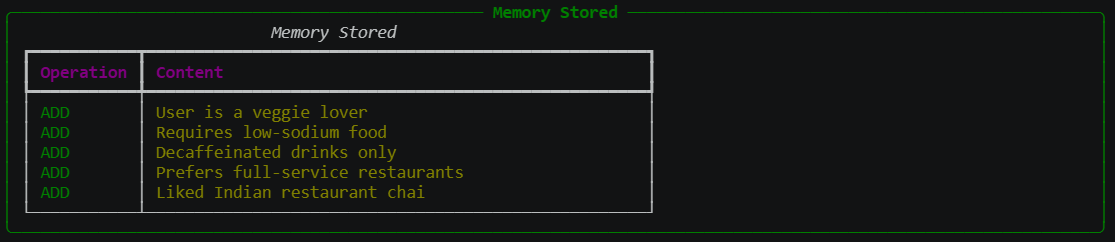
The memory tool prints what it stored:
And the agent replies:
Got it! I've noted that you:

- Love vegetarian meals
- Need low-sodium dishes
- Only drink decaffeinated beverages
- Prefer full-service restaurants
- Enjoy Indian chai (you loved it at the Indian place you visited)

Whenever you'd like a restaurant recommendation, a menu suggestion, or anything else
that fits these preferences, just let me know and I'll pull together the best options for you.
Notice that the agent made one store call, but Mem0 saved five separate memories. That is the "extract facts" step working: Mem0's LLM split one sentence into small, searchable facts.
#Reading the result object
The call also returns an AgentResult with the details of the run. Here it is in full, for the curious:
The full AgentResult
AgentResult(
    stop_reason='end_turn',
    message={
        'role': 'assistant',
        'content': [
            {
                'text': 'Got it! I’ve noted that you:\n\n- Love vegetarian meals  \n- Need low‑sodium dishes  \n- Only drink decaffeinated beverages  \n- Prefer full‑service restaurants  \n- Enjoy Indian chai (you loved it at the Indian place you visited)\n\nWhenever you’d like a restaurant recommendation, a menu suggestion, or anything else that fits these preferences, just let me know and I’ll pull together the best options for you. 🍃🥗☕️'
            }
        ],
        'metadata': {
            'usage': {
                'inputTokens': 881,
                'outputTokens': 131,
                'totalTokens': 1012
            },
            'metrics': {
                'latencyMs': 0,
                'timeToFirstByteMs': 1056
            }
        },
        'tracking_id': '934c53b7-ad06-401b-967f-a33290722a82'
    },
    metrics=EventLoopMetrics(
        cycle_count=2,
        tool_metrics={
            'mem0_memory': ToolMetrics(
                tool={
                    'toolUseId': 'fc_bbaf6aba-ec54-4ca3-87d9-cb11f1b598c5',
                    'name': 'mem0_memory',
                    'input': {
                        'action': 'store',
                        'content': 'User is a veggie lover, requires low-sodium food, decaffeinated drinks only, prefers full-service restaurants, liked Indian restaurant chai.',
                        'metadata': {}
                    }
                },
                call_count=1,
                success_count=1,
                error_count=0,
                total_time=6.409196499967948
            )
        },
        cycle_durations=[7.845792531967163, 1.2326867580413818],
        agent_invocations=[
            AgentInvocation(
                cycles=[
                    EventLoopCycleMetric(
                        event_loop_cycle_id='8a25945d-00f9-4e26-87bd-45dc49110a42',
                        usage={'inputTokens': 566, 'outputTokens': 120, 'totalTokens': 686}
                    ),
                    EventLoopCycleMetric(
                        event_loop_cycle_id='7259d6ed-c5d2-4208-93af-1e3abe04c53b',
                        usage={'inputTokens': 881, 'outputTokens': 131, 'totalTokens': 1012}
                    )
                ],
                usage={'inputTokens': 1447, 'outputTokens': 251, 'totalTokens': 1698}
            )
        ],
        traces=[
            <strands.telemetry.metrics.Trace object at 0x000001DDB28EBB60>,
            <strands.telemetry.metrics.Trace object at 0x000001DDFE4F5A70>
        ],
        accumulated_usage={'inputTokens': 1447, 'outputTokens': 251, 'totalTokens': 1698},
        accumulated_metrics={'latencyMs': 0}
    ),
    state={},
    interrupts=None,
    structured_output=None,
    checkpoint=None
)
The fields that matter:
| Field | Value | Meaning |
|---|---|---|
stop_reason | end_turn | The model finished its answer normally. It wasn't cut off by a token limit. |
cycle_count | 2 | The agent loop ran twice. |
tool_metrics | mem0_memory, 1 call, 1 success, 0 errors | One tool was used, and it worked. |
total_time (the tool's) | 6.4 s | Time spent inside the memory tool. |
cycle_durations | 7.85 s, 1.23 s | Cycle 1 was slow and cycle 2 was fast. |
accumulated_usage | 1447 in / 251 out / 1698 total | Tokens for the whole request. |
The two cycles are the agent loop from the first post: decide, call a tool, read the result, answer.
- Cycle 1 (566 tokens in, 120 out): the model read the message and decided to call
mem0_memorywithaction: store. Then the tool ran. - Cycle 2 (881 in, 131 out): the tool result went back to the model, which wrote the friendly confirmation.
Why cycle 1 took 7.85 s: about 6.4 s of that was the tool. Storing a memory is expensive, because Mem0 calls the Groq LLM to extract facts, then embeds them with fastembed and writes to FAISS. Cycle 2 only had to write one reply, so it took 1.2 s. The output doesn't break the time down, so that split is inferred from the timings.
Why input tokens went from 566 to 881: cycle 2 resends the whole conversation plus the model's own tool call and the tool's result. That is why agents get more expensive as the loop goes on.
Other things worth noticing:
- The model wrote the memory text, not the user. The stored
contentis the model's paraphrase of the message ("User is a veggie lover…"). What gets remembered depends on how the model summarises. - The model only knows the store succeeded. It said "I've noted that you…" but it can't see what was saved. Retrieval in a later session is what proves it worked.
latencyMs: 0probably means this model adapter doesn't fill that field. The real timings aretimeToFirstByteMs(1,056 ms here) andcycle_durations.- Empty fields:
state={},interrupts=None,structured_output=Noneandcheckpoint=Noneare features this run doesn't use. tracking_idandtoolUseIdare random IDs for tracing.
#Check what is in memory
agent1("Show what you remember about me")
Tool #2: mem0_memory
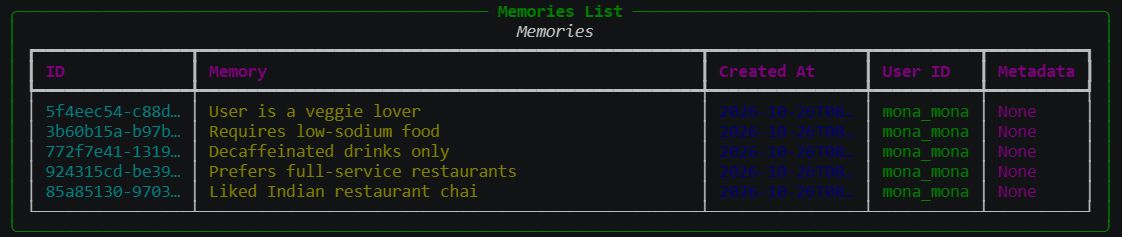
The agent then summarises it in its own words:
| Preference / Detail | Summary |
|---|---|
| Diet | Vegetarian (veggie lover) |
| Health needs | Low-sodium meals |
| Beverage preference | Decaffeinated drinks only |
| Restaurant style | Prefers full-service restaurants |
| Past experience | Loved the chai at an Indian restaurant you visited |
Three different things appear in this output:
Tool #2: mem0_memoryis a log line Strands prints each time the agent calls a tool. It is a running count: the earlierstorecall was the first, so this is the agent's second tool call.mem0_memoryis the tool's name, the one registered withPythonAgentTool("mem0_memory", ...).- The boxed table is printed by the memory tool itself. The model doesn't write it. It is a display for you.
- The summary table is the model's own answer. It read the tool result and rewrote it in its own words.
A few details in the screenshot are worth reading too. The user ID mona_mona is what to_user_id("Mona Mona") produced. All five rows belong to that one user. The … in the ID and date columns is the terminal truncating text to fit its width, and Metadata: None is there because the model passed an empty {} when storing.
#Memory plus live web search
Now the payoff: ask for something that needs both what the agent remembers and fresh information from the web.
from IPython.display import Markdown, display

display(Markdown(str(agent1("Find good restaurant options for me in Bangalore"))))
The agent first logs five tool calls, all web searches:
Tool #3: websearch

Tool #4: websearch

Tool #5: websearch

Tool #6: websearch

Tool #7: websearch
Then it writes the answer, a table of four full-service vegetarian restaurants with tips on keeping the meal low-sodium and the drinks decaf:
The agent's full answer
Here are four full‑service restaurants in Bangalore that line up with everything you told me (vegetarian + low‑sodium + decaffeinated drinks + full‑service vibe). I’ve added a quick note on why each one fits and how you can make the most of your health needs.
| # | Restaurant | Neighborhood / Address | Why it matches you | How to keep it low‑sodium & decaf | Quick contact |
|---|---|---|---|---|---|
| 1 | Phurr – “Vegetarian fine‑dining” | Jayanagar (3rd Block) & Indiranagar – (https://www.phurr.co.in/) | 100 % vegetarian, upscale full‑service setting, creative menu (North‑Indian, Continental, Asian) 【1†source】 | Ask the floor‑manager for “low‑sodium” preparation (e.g., ask sauces on the side, less salt) and request decaf tea/coffee or the mocktail bar’s decaf chai‑based mocktails. The staff are used to customising dishes for health‑conscious diners. | Phone: +91 80 4157 5500 |
| 2 | Neemsi Restaurant – Pure‑veg fine dining | JP Nagar (and Basavanagudi) – (https://neemsirestaurant.com/) | Pure‑veg, large menu with many Jain‑friendly (naturally low‑salt) options, full‑service ambience 【4†source】 | Their menu shows “low‑sodium” markers on several dishes (e.g., steamed veggies, dal without added salt). Mention your low‑sodium requirement; the kitchen can adjust. They also serve decaf masala chai and a range of herbal mocktails. | Phone: +91 80 2662 2000 |
| 3 | Carrots – India’s First Vegan Restaurant | Koramangala & Whitefield – (https://carrots-india.com/) | Vegan/vegetarian, health‑focused, full‑service café‑style, plenty of fresh salads and grilled veggies that are naturally low in sodium. | Choose “no‑salt” or “light‑salt” preparation; the chef will gladly omit added salt. They serve decaf filter coffee, herbal teas, and a decaf chai latte made with plant‑milk. | Phone: +91 80 4155 2000 |
| 4 | 1947 Restaurant – Fine Indian vegetarian cuisine | Multiple locations (e.g., Koramangala, Indiranagar) – (https://1947restaurants.in/) | Upscale vegetarian restaurant with a reputation for “clean” cooking; full‑service table service. | When ordering, ask for “low‑sodium” (most dishes can be prepared with reduced salt) and request decaf chai or decaf filter coffee—they keep a decaf coffee bean stock for health‑conscious guests. | Phone: +91 80 4155 7777 |
How to make the most of each place
- Call ahead (or mention when you’re seated) and say: “I need a low‑sodium vegetarian meal and only decaffeinated drinks. Could the chef prepare my dish with no added salt and recommend a decaf beverage?”
- Ask for sauces on the side – that gives you total control over sodium.
- Look for “Jain/veg‑friendly” labels on the menu; those dishes are often prepared without extra salt or oil.
- Decaf chai tip: many places will brew chai with decaf tea leaves and can swap regular milk for almond/soy if you’d like a lighter version.
A quick “next‑step” plan
- Pick one that sounds most appealing (e.g., Phurr for a chic dinner, Neemsi for a relaxed lunch).
- Reserve a table (most of these spots take online bookings via their websites or phone).
- When you arrive, remind the host of your low‑sodium and decaf needs – they’ll note it for the kitchen.
Enjoy your next Bangalore dining adventure! If you’d like more details (e.g., specific low‑sodium dishes on the current menu, directions, or a reservation link), just let me know. 🌿🍽️☕️
#Why five searches?
Five separate web searches for one request is the agent loop at work. The log shows only the tool name, not the queries or the model's reasoning, so the explanation below is inference.
- Where it fits:
#2was the memory lookup from before, and#3to#7come straight after it. So the agent read Mona's preferences first, then turned them into searches. "Restaurants in Bangalore" alone wouldn't satisfy "vegetarian, low-sodium, decaf, full-service". - You never asked for five. The model chose that itself. Likely reasons, roughly in order of plausibility:
- One search per constraint or angle, such as vegetarian fine dining in Bangalore, then low-sodium options, then decaf availability.
- One search per candidate. After finding restaurant names, it looked up details for each one. The answer has four restaurants, which could fit this.
- Retries after weak or failed results.
websearchcatches errors and returns"Exception: …"as text, so the model can see a failure and try again. Free web search is often rate-limited, so some of the five may have been retries.
- Why they appear one by one:
SequentialToolExecutor()runs tool calls one after another and never in parallel. The model may have requested them all at once or one per loop cycle, and the log doesn't distinguish those. - The cost: each search result goes back into the model's context, so the final call carried a lot of input. That matters on Groq's free tier.
To find out exactly what happened, check the result object after the run:
# response is whatever agent1(...) returned; assign it when you run the query
response = agent1("Find good restaurant options for me in Bangalore")

print("Loop cycles:", response.metrics.cycle_count)
m = response.metrics.tool_metrics["websearch"]
print("Calls:", m.call_count, "ok:", m.success_count, "errors:", m.error_count)
call_count should be 5, and cycle_count tells you whether the calls came in one batch or across several cycles. These are counts only. To see the query text itself you would need to print the tool inputs as they are made.
#Part 2: Short-term memory with LangGraph and AgentCore Memory
Mem0 remembers facts about a user. It doesn't, by itself, keep the ongoing conversation. For that we need short-term memory, the thing that lets an agent answer "what did I just ask you?" in the middle of a session.
This part comes from a second course notebook. A math agent does a multi-step calculation, answers a follow-up question about it, and then shows that a brand-new session starts with a blank slate. Only the agent's model runs on Groq. The memory runs on AWS, so you need AWS credentials but no Bedrock model access.
#LangChain, LangGraph and state
Part 1 used Strands. This part uses LangChain and LangGraph, so a quick orientation first.
LangChain is an open-source framework for building applications on top of LLMs. It gives you ready-made building blocks, so you don't write the plumbing for each model provider and each tool yourself. It provides:
- Model wrappers: one interface for many providers (OpenAI, Anthropic, Groq, Ollama and others). Swapping models means changing one line.
- Prompts and output parsing: templates for prompts, and helpers that turn model text into structured data.
- Tools: a standard way to give a model functions it can call.
- Agents: a loop where the model decides which tool to call, reads the result and continues, the same idea as the Strands loop.
- Retrieval (RAG): loaders, text splitters, embeddings and vector store integrations, for answering questions over your own documents.
- Memory and chat history: helpers for carrying conversation state.
- Integrations: hundreds of third-party connectors, split into separate packages such as
langchain-groqandlangchain-openai.
The family of packages:
| Package | Role |
|---|---|
langchain | Core agent and chain building blocks |
langchain-groq | Connector that lets LangChain talk to Groq models |
langgraph | Lower-level library for stateful, multi-step agent workflows drawn as a graph of nodes. It also handles branching, loops and multi-agent setups. |
langsmith | Tracing and evaluation, so you can see what an agent did (a separate product) |
LangGraph builds agents as a graph. Each box in the graph is a step (a node), such as "ask the model" or "run a tool", and the arrows say which step comes next. The agent loop (decide, call a tool, read the result, decide again) is just a graph with a cycle in it.
What travels through the graph is called the state. For a chat agent, the state is mostly one thing: the list of messages so far. The helper langchain.agents.create_agent builds the graph for you, so you don't have to draw the boxes yourself.
#Checkpoints and checkpointers
A checkpoint is a snapshot of the state, taken after a step. A checkpointer is the component that saves those snapshots and loads them back. Once an agent has one, you get several things almost for free:
- Continue a conversation: load the latest checkpoint and carry on.
- Survive crashes: if the process dies, resume from the last snapshot.
- Inspect history: see how the state looked after each step.
By default a checkpointer can simply keep snapshots in RAM, and they disappear when the program stops. The point of this notebook is to swap in a durable one that stores them in the cloud.
#Amazon Bedrock AgentCore Memory
AgentCore Memory is a managed memory service from AWS, part of Amazon Bedrock AgentCore. You create a memory resource, a storage container identified by a memory_id, and then read and write to it. It can do two jobs:
- Short-term: store the raw sequence of events in a conversation. This is what we use here.
- Long-term: extract and keep facts across sessions. This needs extraction strategies, which the notebook says aren't needed for short-term memory, so we skip them.
Because the data lives in AWS and not in your notebook's RAM, the agent can pick up where it left off, even from a different process or machine.
#thread_id, session_id and actor_id
AgentCore organises memory with two IDs, and LangGraph has its own name for one of them:
| In LangGraph | In AgentCore | Meaning |
|---|---|---|
thread_id | session_id | One conversation. A new value means a fresh conversation. |
actor_id | actor_id | Who the conversation belongs to: a user or an agent. |
You pass both in the run config, and both are required. This is the lever that controls what the agent remembers: same thread_id, same conversation; new thread_id, blank slate.
#Install and import
%pip install -q -r requirements-groq.txt
If pip upgrades packages that are already loaded, restart the kernel before continuing.
import os  # standard library: read environment variables

# MemoryClient: AWS-side client for managing AgentCore Memory resources
# (create, look up, delete). It comes from the bedrock-agentcore package.
from bedrock_agentcore.memory import MemoryClient

# load_dotenv: reads KEY=value lines from a .env file into environment variables
from dotenv import load_dotenv

# create_agent: LangChain helper that builds a ready-made agent
# (model + tools + loop) as a LangGraph graph
from langchain.agents import create_agent

# init_chat_model: provider-neutral way to create a chat model from a name
from langchain.chat_models import init_chat_model

# tool: decorator that turns a Python function into a tool the model can call
from langchain.tools import tool

# AgentCoreMemorySaver: a LangGraph checkpointer that saves checkpoints in
# AgentCore Memory instead of RAM (from the langgraph-checkpoint-aws package)
from langgraph_checkpoint_aws import AgentCoreMemorySaver

load_dotenv()  # reads GROQ_API_KEY from a .env file, if present

# Which Groq model to use. Falls back to gpt-oss-120b if GROQ_MODEL_ID isn't set.
MODEL_ID = os.getenv("GROQ_MODEL_ID", "openai/gpt-oss-120b")

# AgentCore Memory lives in an AWS Region. Look for AWS_REGION first, then
# AWS_DEFAULT_REGION, and use us-east-1 if neither is set.
REGION = os.getenv("AWS_REGION", os.getenv("AWS_DEFAULT_REGION", "us-east-1"))

print(f"Model: {MODEL_ID} | Region: {REGION}")
Which pip package each import comes from:
| Import | Pip package | Role |
|---|---|---|
bedrock_agentcore | bedrock-agentcore | Talks to AgentCore, including creating memory resources |
langgraph_checkpoint_aws | langgraph-checkpoint-aws | The AgentCore-backed checkpointer for LangGraph |
langchain | langchain | create_agent, init_chat_model and tool |
dotenv | python-dotenv | Loads secrets from a .env file |
Nothing here is the model itself. The Groq connector is loaded later, by name, inside init_chat_model.
#Create the memory resource
# Admin client for AgentCore Memory, pointed at our Region
client = MemoryClient(region_name=REGION)

# Create the memory the first time; on later runs, find and reuse it.
# It waits until the resource is ACTIVE before returning.
memory = client.create_or_get_memory(
    name="MathLanggraphAgentGroq",
    description="Short-term memory for the LangGraph math agent",
)

# The resource's ID. The checkpointer needs this to know where to save.
memory_id = memory["id"]

# .get() returns None instead of raising an error if "status" is missing
print("Memory ID:", memory_id, "| status:", memory.get("status"))
create_or_get_memory is idempotent: running it twice doesn't create two resources. The first call can take a little while because AWS has to provision the resource, and the call waits for it to become ACTIVE. No extraction strategies are configured, so this resource only stores raw conversation events.
#The checkpointer and the model
# The checkpointer: tells LangGraph to save every step into the AgentCore
# Memory resource we just created. Region must match where it lives.
checkpointer = AgentCoreMemorySaver(memory_id, region_name=REGION)

# The model. "groq" picks the Groq connector, MODEL_ID picks the model.
# max_retries=5 retries dropped connections or rate-limit hiccups.
# The key is read from the GROQ_API_KEY environment variable.
llm = init_chat_model(MODEL_ID, model_provider="groq", max_retries=5)
This is the cleanest place to see the split: the model runs on Groq and the memory lives on AWS. Changing one doesn't affect the other.
#Tools and the agent
@tool  # makes this function a tool; the docstring becomes its description
def add(a: int, b: int) -> int:
    """Add two integers and return the result."""
    return a + b


@tool
def multiply(a: int, b: int) -> int:
    """Multiply two integers and return the result."""
    return a * b


tools = [add, multiply]  # the list we hand to the agent

graph = create_agent(
    model=llm,          # the Groq model
    tools=tools,        # the tools it may call
    # Tells the model to always use the tools instead of calculating itself
    system_prompt="You are a helpful assistant. Use the tools for every calculation.",
    # The line that adds memory: save and load state through AgentCore
    checkpointer=checkpointer,
)

graph  # in a notebook, the last expression is displayed, here as a diagram
@tool works the same way as in Strands: the function name, type hints and docstring are all the model sees. Why use tools for arithmetic? Language models are unreliable at multiplying big numbers in their heads, and a function is exact.
The result is called graph because that is what it is: a LangGraph graph with a model step, a tool step and the arrows between them. Without checkpointer=checkpointer it would still work, but it would forget everything between runs.
#Run it
# The run config. Both IDs are required by the AgentCore checkpointer.
config = {
    "configurable": {
        "thread_id": "session-1",    # maps to AgentCore session_id: one conversation
        "actor_id": "react-agent-1", # maps to AgentCore actor_id: who it belongs to
    }
}

# The input: a list of messages, each with a role and content
inputs = {
    "messages": [
        {"role": "user", "content": "What is 1337 times 515321? Then add 412 and return the value to me."}
    ]
}

# Run the agent and print each step as it happens
for chunk in graph.stream(inputs, stream_mode="updates", config=config):
    print(chunk)
graph.stream runs the agent and hands you results as they happen, instead of waiting until the end. stream_mode="updates" means each chunk is only the change made by one step, labelled with the name of the step that made it. (A values mode also exists, which gives you the full state each time.)
What to expect: the question has two parts, and the second depends on the first, so the model can't do them at once.
- The model asks to call
multiplywith 1337 and 515321. - The tool returns 688,984,177.
- The model asks to call
addwith that result and 412. - The tool returns 688,984,589.
- The model writes the final answer.
Each of those steps is one chunk on the screen, and after each one the checkpointer saves a snapshot to AgentCore. The exact names on the chunks depend on the library version, but they are usually the model step and the tools step.
#Inspect the saved state and its history
# get_state loads the latest checkpoint for this thread from AgentCore
for message in graph.get_state(config).values.get("messages"):
    # message.type tells who wrote it; message.text is the content as a string
    print(f"{message.type}: {message.text}")
    print("=" * 40)  # a separator line
This reads the conversation back from AWS, not from your notebook's variables. The type is one of a small set: human for you, ai for the model and tool for tool results. For this question, expect about six messages: your question, the model's call to multiply, its result, the call to add, its result and the final answer. The ai messages that call tools may have empty text, since their content is the tool call.
# Every checkpoint saved for this thread, most recent first
for checkpoint in graph.get_state_history(config):
    print(
        # Each checkpoint has its own ID...
        f"Checkpoint {checkpoint.config['configurable']['checkpoint_id']} "
        # ...and its own snapshot of the messages at that moment
        f"— messages in state: {len(checkpoint.values.get('messages', []))}"
    )
This is the part that shows what a checkpointer really is. The list starts at the newest checkpoint, with every message, and goes back in time with fewer and fewer messages, until the empty start. Every step in the run left a snapshot behind.
#Continue a session, then start a new one
First, a follow-up in the same session. It reuses the same config, so the same thread_id:
# Same config as before, so the same thread_id: "session-1"
inputs = {"messages": [{"role": "user", "content": "What were the first calculations I asked you to do?"}]}

for chunk in graph.stream(inputs, stream_mode="updates", config=config):
    print(chunk)
Nothing in this message mentions the numbers. The agent can answer only because the checkpointer loaded the earlier messages for session-1 and put them in front of the model. The answer should mention 1337, 515321 and 412. This is short-term memory working.
Then the same kind of question in a new session:
# Same actor_id, but a NEW thread_id, so a brand new conversation
config = {
    "configurable": {
        "thread_id": "session-2",     # new session
        "actor_id": "react-agent-1",  # same actor
    }
}

inputs = {"messages": [{"role": "user", "content": "What values did I ask you to multiply and add?"}]}
for chunk in graph.stream(inputs, stream_mode="updates", config=config):
    print(chunk)
Now the agent has no history to work from, because session-2 has no checkpoints. It should say it doesn't know what you mean. The actor_id is the same as before and it makes no difference: short-term memory is per session, not per actor.
This cell also reassigns the config variable. After it runs, config points at session-2, so if you re-run an earlier cell afterwards, it will quietly use the new session.
#Clean up
# Delete the AgentCore Memory resource and everything stored in it.
# Wait up to 300 seconds, checking every 10 seconds, until it's gone.
client.delete_memory_and_wait(memory_id=memory_id, max_wait=300, poll_interval=10)
print("Deleted memory", memory_id)
This deletes the whole resource, including all saved sessions. Next time you run the notebook, create_or_get_memory will create a fresh one.
#Part 3: Putting the two together
Here is how the two setups compare:
| Strands + Mem0 | LangGraph + AgentCore Memory | |
|---|---|---|
| Kind of memory | Long-term facts | Short-term conversation state |
| What gets stored | Facts the model extracted ("decaf only") | Every message and tool result |
| Scoped by | user_id | thread_id and actor_id |
| Who decides what to save | The model, by calling the memory tool | The checkpointer, automatically at every step |
| Where it lives | A local FAISS index | AWS |
The key difference is that the agent never chooses to save a checkpoint. It happens automatically at every step, while Mem0 only stores what the model decides to send it.
The two aren't alternatives. A real assistant normally wants both: checkpoints so a conversation can continue, and long-term memory so it knows the user next week.
DataRequest or acknowledgment
This diagram is the general pattern, not something either notebook builds on its own: they use different frameworks, so combining them would take extra wiring.
#Things that can trip you up
- Mismatched vector sizes. The embedding model and the FAISS index must agree on the number of dimensions. Here that is 1024.
- Different embedding models for storing and searching. Vectors from different models aren't comparable.
- Parallel writes to a local index. Without
SequentialToolExecutor, memories can be silently lost. - Unchecked search results. An agent can sound confident about details the search never returned.
- AWS credentials or permissions missing. The failure shows up at
create_or_get_memory. Check your credentials and the IAM permissions listed above. - Region mismatch. The memory resource lives in one Region. Use the same
REGIONfor the client and the checkpointer, as the notebook does. - Forgetting
thread_idoractor_id. Both are required by the AgentCore checkpointer. - Groq rate limits. On a free tier, expect an occasional HTTP 429.
max_retries=5helps with some of it. - Leaving the AWS resource behind. If the notebook stops before the last cell, delete the memory resource yourself.
#Summary
An LLM is stateless, so an agent's memory is whatever text is put back into its prompt. Short-term memory is the transcript of one conversation, kept by checkpointing the agent's state per thread (LangGraph with AgentCore Memory). Long-term memory is facts pulled out of conversations, stored as embeddings and searched by meaning (Mem0 with a local FAISS index), one store per user. Real assistants want both.
#Concepts at a glance
| Concept | In one line | Why it matters |
|---|---|---|
| Stateless model | Forgets everything between sessions | Memory means putting text back into the prompt |
| Short-term memory | The messages of one conversation | Continue a chat from a saved checkpoint |
| Long-term memory | Facts and preferences across sessions | Knows the user next week |
| Embedding and FAISS | Text as vectors, searched by meaning | Finds related memories without exact words |
| Mem0 | Extracts, stores, updates and searches facts | One agent per user keeps memories apart |
| Checkpointer | Saves the graph state after each step | Resume by thread_id |
| AgentCore Memory | A managed store with actor_id and session_id | No database to run yourself |
#Test yourself
Why does an agent need memory at all?
The model is stateless: it only knows what is in the current prompt. Memory puts the right information back in.
What is the difference between short-term and long-term memory?
Short-term is the transcript of one conversation. Long-term is facts kept across conversations.
Why must storing and searching use the same embedding model?
Vectors from different models aren't comparable.
What identifies a conversation to the checkpointer?
The thread_id, and the actor_id for AgentCore.
Why use SequentialToolExecutor with a local FAISS index?
Parallel writes can silently lose memories.
What do you do if the notebook stops before the cleanup cell?
Delete the AWS memory resource yourself.
Next: Agents that work together.
#Resources
- Agents that remember, the course material behind Part 1
- The course notebook behind Part 2:
math_agent_with_checkpointing_groq - Building my first AI agent with Strands and Groq
- Giving an AI agent tools
- Agents that work together